Schulz Consulting office manager makes the front page of Gizmodo

October 31, 2008

Not what you're looking for? Check out Schulz Consulting Prior MAS90 News Post Archives or send me an email. Thanks for visiting!


gizmodo gmail.jpg

Some of you know that Wayne Schulz is an active team member over at web site Geardiary.com where he reviews and writes about technology, deals and the occasional offbeat article.

Last night Google added free outgoing SMS text messaging to their Gmail Chat service. Wayne did a story on that over at Geardiary. He used the image of a contact record for Pat (our office manager) in this short news article.

Gizmodo, a popular gadget blog with over 6 million monthly readers worldwide, picked up the image from the article – turning Pat into a mini-celebrity of sorts.

The autograph line starts by the coffee machine this morning…
  • Share/Bookmark

Sage MAS Community continues to grow members

October 31, 2008

Even though the Sage MAS Community has yet to formally launch, there are already an impressive number of members signed up to the service.

Most of these are Sage Software employees – which is perhaps the most impressive portion of the current user count.

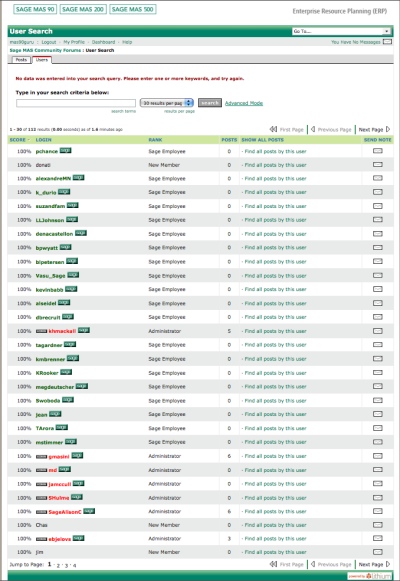
Based on a quick early morning count (as of 10-31-2008) the forum shows 112 members broken down as:

  • Total Members: 112
  • Administrators: 8
  • Members with Sage “badges”: 69
  • Non-Sage identified members: 42

The image below is a partial publicly available list of forum members. Notice the heavy presence of the green Sage badge which formally identifies the user a Sage Software employee.

These employees likely had to sign up on their own and the extent of those who have done so seems to show a big push by Sage to make this new discussion forum a success.

Messages left late last night in the new forum seem to indicate that the previous SageTalk forum will be slowly wound down with members encouraged to migrate to this new forum. There does not appear to be any plans to migrate the old message database from SageTalk to the new forums.

sage mas community roster.jpg

Sign up for the new Sage MAS Community by visiting the site here. At present (and hopefully for the future) reading messages posted to the site is not password protected – though you will have to create an account to leave a message.

Sage Software has indicated that they intend to leave the access this way which is a change from their previous forum (SageTalk) that required members to log in first to the Sage Software technical support area and then again into SageTalk.

  • Share/Bookmark

Gmail offers free SMS text messaging to US phones

October 30, 2008

gmail sms text.jpg

Google just introduced a new feature that allows Gmail users to send free SMS text messages to their contact’s cell phones. These short messages can be sent while using the Gmail chat feature which is part of the Gmail interface. Unfortunately these messages can only be sent to US phones and it is send only — you won’t receive replies.

In order to use this feature you must first enable it via the settings tab in Gmail. Since this is a Labs feature – you should consider it experimental.

At this time the capabilities have not been added to any of the Google widgets or instant message clients, though I would expect that they’d appear soon.

via: Geardiary

  • Share/Bookmark

Sage Tip: Get alerts when new messages are posted to Sage MAS 90 message board

October 29, 2008

pingie.jpg

One of the most convenient ways to read content on the Internet is via the use of RSS feeds. With an RSS feed you can quickly skim the titles of different articles that have been published online. Most sites – including the new Sage Software Message Boards – support the use of RSS feeds.

For those of you who may be more casual users of the Internet or who don’t want to log onto an RSS reader to check messages – here’s an interesting solution that I’ve been using for the past three months.

The service is called Pingie. It’s presently free and in beta with a limitation of 5 different feeds that may be added to each individual account.

What Pingie does is watch your RSS feeds and send out an alert each time the feed is updated.

pingie alert email.jpg

This is useful for times when you would like to know that a new message has been posted into a specific forum without having to constantly log into the site and view the list of new messages on your computer.

Here’s an example of how to setup the Core Financial Message Board in Pingie so that every time someone posts a new message (or reply) you will get a notification.

Note: These notifications can be sent to either your email address or to a cell phone via SMS.

pingie sm.jpg

Link: Pingie

  • Share/Bookmark

How to read the new Sage MAS90 Discussion Forums via RSS

October 28, 2008

One of the best new features of the Sage MAS90 Discussion forum is the ability to read all of the messages in an abbreviated format known as RSS.

Click on the image to the left to see an example of my RSS feeds (as shown in Google Reader) that I use to keep up with technology. Notice that only the headlines of each article are shown.

RSS stands for Really Simply Syndication. In it’s most basic form what it means is that instead of reading the lengthy articles (message posts) you can use a special type of software to read the headlines. When you find a headline that is of interest you can click to read the entire article. (Read more about RSS at Wikipedia)

Fortunately you don’t even need to load any special software (although there are dedicated software RSS feed readers). Google has a free reader that is very popular both because it is simple to use and can be accessed via any web browser.

To setup your Google Reader account:

  1. Log into the Google site via http://www.google.com/reader.
  2. If you don’t already have a Google account, you’ll be prompted to create one.
  3. Once you’ve created a Google account, click on any of the links below (I’d recommend adding them all) to have the RSS feeds from the new Sage Software MAS 90 Discussion Forum automatically added to your Google Reader.

A list of the Sage MAS 90 RSS feeds are as follows:

(After you’ve setup Google Reader – clicking any of the links below will add them to your feeds so they can be read at any time)

Core Financial Modules

Distribution, Manufacturing & Internet Modules

Customer Relationship Management

Unique Business Challenges and General Discussion

Personalization, Customization & Productivity Tools

Technical and Installation Discussions

Time Tracking & Job Costing Modules

  • Share/Bookmark

Sage Software soft launches new message board community

October 28, 2008

sage software community message boardSage Software has soft launched a new messaging forum which appears designed to replace or substantially duplicate their existing SageTalk forums.

This area, powered by the Lithium online community software, has separate areas for each of the SAGEMAS products – Sage MAS 90 and 200, Sage MAS 500 and Extended Enterprise Suite.

One of the huge improvements to the discussion area is the ability to read the forum messages without logging in or registering for a user ID (previously the SageTalk messaging system required a login in order to view messages).

The new message board also includes RSS feeds so that you can preview messages in your favorite RSS reader (I strongly recommend Google Reader).

A list of the Sage MAS 90 RSS feeds is as follows:

Core Financial Modules

Distribution, Manufacturing & Internet Modules

Customer Relationship Management

Unique Business Challenges and General Discussion

Personalization, Customization & Productivity Tools

Technical and Installation Discussions

Time Tracking & Job Costing Modules

At present there is at least one private community that is also hosted, the Sage MAS 90 and 200 Developer Community. Access to this area appears to be by special request only.

Sage corporate blogs will also be housed within this community. Interestingly it appears that most (if not all) of the communication will take place behind a password protected entrance – meaning the general public won’t be able to read the information without a login and password and what goes on in the forums and blogs will likely not be indexed by Internet search engines such as Google. Update: It appears that you can indeed access this site to read messages and blogs without logging in.

For this initial soft launch there was no requirement to enter a Sage Software customer or reseller ID (as was the case with SageTalk). There’s also no confirmation on what may happen to the SageTalk discussion forum which largely duplicates the mission of the new Sage MAS community.

sage community online.jpg

The mission of this community is to enable all Sage MAS ERP customers to share, learn, and support each other on a broad spectrum of issues and interests. While Sage’s intent is for customers to network, form connections and share useful information, our North American Support team does monitor the site and may periodically respond to unanswered technical posts. Should you require an immediate response to technical issues, we have a variety of support options.

The MAS 90 and MAS 200 community are:

sage mas90 forum.jpg

Sage MAS 90 and 200 Discussion Forum

  • Core Financial Modules
  • Distribution, Manufacturing and Internet Modules
  • Customer Relationship Management
  • Unique Business Challenges and General Discussion
  • Personalization, Customization and  Productivity Tools
  • Technical and Installation Discussions
  • Time Tracking and Job Cost Modules

Extended Enterprise Suite Discussion Forum

    sage extended enterprise.jpg
  • General Discussion

Sage MAS 90 and 200 Blogs

sage blogs.jpg
  • Alok Tyagi (VP of R&D)
  • Mike Morper (Sr Director of Product Management – Sage MAS product lines)

News and Fast Tips

sage news and fast tips.jpg
  • News
  • Fast Tips

For now registration for the community is free and access is instant. It is not known whether in the future this forum will require entry of your Sage Software customer or reseller number to further authenticate you and issue a user login.

Link: Visit Sage MAS Community

  • Share/Bookmark

Sage Extended Enterprise FAQ (Frequently Asked Questions)

October 28, 2008

Sage Software has published a list of frequently asked questions (FAQ) about their new Extended Enterprise Suite which bundles the Sage MAS 90 or 200 plus SageCRM plus Sage FAS 100 (1,500 assets maximum).

Because this new suite includes a number of different modules as well as the CRM and Fixed Assets – there is a new pricing which provides for a bundle of modules (listed below) which are available for a flat fee per user. Basic maintenance is 19% of the purchase price or 25% of the purchase price for basic maintenance plus unlimited Sage support.

Existing customers can upgrade their existing software to the Enterprise Suite for an upgrade fee (consult your local reseller for details.

Included Modules

  • Library Master
  • Business Insights
  • Paperless Office
  • General Ledger
  • Accounts Payable
  • Accounts Receivable
  • Bank Reconciliation
  • Fixed Assets
  • FRx Desktop – Single User
  • Crystal Reports Designer – 2 user
  • Inventory Management
  • Sales Order
  • Purchase Order
  • Return Merchandise Authorization
  • Credit Card Processing by Sage
  • Bill of Materials
  • Customer Relationship Management (sales, marketing and support)
  • Custom Office
  • Visual Integrator
  • Federal and State eFiling and Reporting

Download Extended Enterprise FAQ(PDF)

  • Share/Bookmark

JobOps for Sage MAS 90 and 200 version 4.3

October 28, 2008

The latest version of the popular job management software package Job Ops has just been released in version 4.3 format. This new update is compatible with the latest Sage MAS 90 and 200 accounting software which was released in June 2008.

Sage MAS 90 and MAS 200 contains a Job Costing module which is adequate for many small job tracking situations. However if your company wants to get more in depth with job tracking, then you should consider JobOps.

One of the key features which has proven atrractive is JobOps ability to begin the job process with a quote. Starting in Sales Order, work tickets are fashioned from their original quote status. This is a step that standard Sage MAS 90 and 200 doesn’t provide and one of the key reasons that over 600 Sage MAS 90 and 200 users have turned to Job Ops for increased Job Management flexibility.

job ops estimatingWe also have clients that migrate to JobOps due to the configurator module which enables the creation of a product from a much more complex matrix of possible options and materials.  Once this product has been created, it can be fully integrated into the job management function of the software.

Some of the key features of JobOps for Sage MAS 90 and MAS 200:

Estimating

  • Re-use past quotes to create new ones
  • Combine bills of material, routings, labor and services to create a detailed cost roll-up
  • Automatic update of material costs
  • Product configurator assists with selecting options and calculating final price

Sales Orders & Work Ticketsjob ops work tickets and sales orders

  • Fast conversion from quote to sales order
  • Generate work tickets automatically
  • Check availability of material prior to release
  • Product documentation and procedures can be attached to job ticket
  • Automatically create item price via product configurator

Job Planningjob ops job planning

  • Verification of quote accuracy and pricing
  • Material availability
  • Purchasing shortages
  • Production scheduling
  • Track estimates (current versus revised)

Field Service & Dispatch

  • Service ticket creation
  • Scheduling dispatch board

  • Customer contracts, equipment history, warranty tracking
  • Preventive maintenance orders
  • Integration to Microsoft Outlook
  • Dashboard

Product Configurator

  • Quickly configure custom product estimates
  • Generate a bill of materials and routing

    job ops product configurator

  • Graphical rules based wizard eases data entry
  • Update pricing automatically based upon configuration
  • Smart part numbers to uniquely identify a newly configured part
  • Web enabled for remote configuration entry

For more information on Job Ops for Sage MAS 90 and MAS 200 please download this full color PDF brochure that contains additional details. We will happily provide you with the names of consultants we know in your area who can assist with implementing Job Ops for Sage MAS 90 and 200.

Link: JobOps Brochure

  • Share/Bookmark

Best Buy prices the Blackberry Bold at $399 with 2 year contract

October 26, 2008

best buy blackberry bold.jpg

There’s been a lot of speculation over not only the ship date for Blackberry’s latest flagship model – the Blackberry Bold – but over what the ultimate pricing will be.

It looks like at least one major reseller will be pricing the Blackberry Bold at $399 after a 2 year contract.

(NOTE: After visiting the Berlin CT Best Buy, I am convinced that even though the sales circular lists $399 as the price for the Blackberry Bold — the store price  will be $299 for new activations on a plan of $65/mo or more and $349 on a plan that is less than $65/mo).

If you are an existing AT&T customer eligible for an equipment upgrade you can get the device at only $20 more – or $419 the price is $349. If you’re not eligible at all for an upgrade then you’ll pay the full boat price of $659.

This pricing is surprising because AT&T had announced that their price on the Blackberry Bold would be $299 when it is officially released in their stores nationwide November 4, 2008.

This will be an interesting story to watch. The wildly popular iPhone is a cheaper choice at $199 for an 8GB model and $299 for a 16GB. Arguably the iPhone has more capabilities with a vastly larger inventory of downloadable programs and the same (or similar) monthly data service pricing.

Will a $399 $299 Blackberry Bold sell into an economy that is facing more bad news each day? Will Best Buy lower their pricing to meet the AT&T announced pricing?

Click the photo at left for a larger image of the Blackberry display in the Berlin CT Best Buy. If you look closely at the price tag you’ll see the advertised pricing for new plans, upgrades and outright purchases.

via: Best Buy Sales Circular

  • Share/Bookmark

Metro North (MTA) Grand Central train schedule for your iPhone

October 24, 2008

station stop MTA Schedule.jpg

Do you ride the Metro North commuter train into New York City? Do you have an iPhone?

If so, here’s a way you can take the full schedule into and out of Grand Central Terminal on your iPhone. There’s no internet connection required to read the schedule as everything is stored on your iPhone.

To use the program you key in whether you are going into or out of Grand Central (one flaw is that you can’t use this schedule to show intermediate stops such as whether the train stops at a certain station on the way into Grand Central Terminal).

The resulting schedules is displayed on your iPhone which also includes the estimated travel times and whether the fare is considered to be peak or off peak.

This is a nice little application for those of us looking to eliminate some paper and make fuller use of our iPhones to carry useful information.

Link: Station Stops (iTunes)
Link: Station Stops Web Site

  • Share/Bookmark

Netsuite offers 50% discount to Salesforce.com customers via RenewForce

October 23, 2008

netsuite renewforce.jpg

Software as s service vendor Netsuite has rolled out a program termed RenewForce that promises 50% off the cost of any Salesforce users existing contracts.

Their offer is valid through December 31, 2008 and Netsuite claims to offer more features for less with their NetSuite CRM that includes creating estimates and quotes, sales-order generation, management of multiple quotas and forecasts, support for cross-selling and up-selling, commission management, integrated e-mail marketing and pre-configured sales dashboards.

NETSUITE RENEWFORCE PROGRAM SAVES CUSTOMERS 50% ON THEIR SALESFORCE.COM INVOICE

With RenewForce, Salesforce.com Customers Move From Standalone SFA to Feature-Rich CRM and Leading SaaS Suite for ERP, CRM and Ecommerce

SAN MATEO, Calif. — October 22, 2008 — NetSuite Inc. (NYSE: N), a leading vendor of on-demand, integrated business management software suites for mid-market enterprises and divisions of large companies, today announced a new program aimed at salesforce.com customers who are eager to realize greater value from their customer relationship management (CRM) investment, as well as relief from some of the industry’s highest on-demand subscription fees. The NetSuite RenewForce Program offers all salesforce.com customers the opportunity to drop their standalone sales force automation (SFA) offering from salesforce.com in exchange for NetSuite CRM+ at a cost NetSuite guarantees will be 50% off the value of their current salesforce.com implementation.

NetSuite anticipates that salesforce.com customers will find a lot to like about the NetSuite RenewForce offer as they seek opportunities in this economic downturn to realize greater value across their operations. As an on-demand suite with built-in integration and business analytics, NetSuite offers substantially more value than the standalone salesforce.com SFA application and at substantially less cost. For more information about the NetSuite RenewForce program, please visit www.netsuite.com/renewforce.

The NetSuite RenewForce program is available now for a limited time only to all current salesforce.com customers in good standing. The 50% discount will apply to a comparable license for NetSuite CRM+, including customer support and implementation services.

“RenewForce ends the age of being forced to pay $125 per-user-per-month for basic contact management and SFA,” said Zach Nelson, NetSuite CEO. “In this environment, reducing costs and increasing productivity are key, and applications like NetSuite CRM+ that include—but go well beyond—basic SFA functionally enable companies to do a lot more with a lot less.”

Salesforce.com customers who take the NetSuite offer receive much more than just a 50% discount and a great product. They also receive important customer relationship management functionality not found in salesforce.com, including the ability to:

* Create estimates or quotes
* Generate sales orders
* Manage multiple quotas and forecasts
* Automate support for cross-selling and up-selling
* Manage incentive management (commissions) within the system without using a third product
* Conduct integrated email marketing
* Pre-configure dashboards for business intelligence, and more

For more information about NetSuite Inc., please visit www.netsuite.com.

NOTE: NetSuite and the NetSuite logo are registered service-marks of NetSuite Inc.
For more information on the offer visit RenewForce.

via: Informationweek

  • Share/Bookmark

T-Mobile G1 Android phone goes on sale today

October 22, 2008

t-mobile G1.jpg

The wait is over.

Google’s open source phone operating system is shipping today (October 23, 2008) initially at T-Mobile. The current selection of phones is slim (and ugly in my opinion) with only an HTC slider (The G1). Since Android is an open source phone software, it means that carriers can freely incorporate it into their handsets.

Unfortunately the G1 design, while incorporating a keyboard, is a rather tired looking copy of the T-Mobile Sidekick.  Currently this is the only phone on the market that comes pre-loaded with the Android operating system. There will undoubtedly be several additional models introduced by other carriers over the next six to nine months.

Remember that since Android is an open source operating system that carriers are free to use it without any payment. They also likely will modify it to provide a customized look and feel. Due to the open source nature of the software there will not be any exclusivity period with one carrier.

You’ll quickly see other carriers pick this up and by the middle of next year I think all the major USA based operators will have at least one Android phone.

Here are the quick specifications:

  • Touch Screen
  • QWERTY Keyboard
  • One-Touch Google Search
  • Real Web Browsing
  • Easy Access to Google Apps
  • 3G Network and Wi-Fi Access
  • IM/Text/E-mail
  • 3.2 Megapixel Camera
  • YouTube™ Videos
  • Music Player
  • Android™ Market
  • Customizable Home Screen

For more information you can check out T-Mobile’s Android G1 site at the link below (My recommendation is to wait and see what other phone models might be introduced in the next 6 months).

Link: T-MobileG1.com

  • Share/Bookmark

Sage Software Maintenance and Support Plan Video Online

October 22, 2008

sage maintenance video.jpg

Looking for a MAS90 phone support plan? Here’s an overview video from Sage Sage Software that tries to sell you on the benefit of their phone and basic maintenance plans.

This raises an interesting question about vendor help desk support and the support offered by a local experienced consultant.

Should your company use a local source of support? Or should you contract with a software vendor’s help desk to answer all of your accounting software technical questions?

Here are my summarized thoughts (feel free to take issue with any or all of them in the comments):

Use vendor support If:

  • You don’t want to interact with local consultants.
  • You have very routine support requests that are more often resolved by looking in a knowledgebase and reading the results off the screen.
  • You are ok dealing with a help desk employee who may not have ever installed a live MAS 90 or MAS 200 system (vendors don’t like to admit this but a high percentage of their help desk employees may not have ever worked in the field setting up the software).
  • You don’t mind handling emergencies on your own with phone guidance.
  • You don’t mind tracking and following up with reported issues and installing your own software patches.
  • You are comfortable installing MAS 90 or MAS 200 on your own (may be needed in some support situations).

Consider A Local Consultant If:

  • You don’t want to pay twice (once for phone and again if on-site service is needed).
  • You prefer not to debug issues yourself.
  • You want to deal with a consultant who has installed MAS90 in a live environment.
  • You actively seek out second opinions and recommendations versus a reactive help desk.
  • You want in-depth recommendations versus help desk support.
  • You want references for different issues you are dealing with.
  • You want to tap into a local consultant’s network of fellow consultants (for example we have 20+ consultants who do nothing but MAS90 and have joined in a formal alliance to support our clients)

These items that I’ve listed above are general in nature. Not every item applies in every situation. Use the list as a starting point in making your own decision.

I am biased in preparing this list as we offer phone support at the same price point as Sage Software. Therefore I recommend that you take all of the items here with a large grain of salt and make your own decisions about where to obtain phone support for Sage MAS 90 and 200.

Link: Sage Software Support Video

  • Share/Bookmark

Sage Software Webinar 10/23/08: Migrate from Sage MAS 90 to Sage MAS 500

October 20, 2008

Thinking about making a move from your current Sage MAS 90 or 200 software? If you’re interested in knowing more about the next step up – aka MAS 500 – this free Webcast on October 23, 2008 is for you.

Built from the ground up with Microsoft SQL Server, Visual Basic, and Microsoft Office technology, Sage MAS 500 ERP is a complete enterprise management solution. Migration to Sage MAS 500 may be just the step you need to take your business to the next level. In this Webcast, the following Sage MAS 500 features will be discussed and demonstrated:

  • Data Migrator
  • Intercompany Transactions
  • National Accounts
  • Warehouse Automation
  • Inventory Replenishment
  • Advanced Planning and Scheduling
  • Inquiry and Analysis
  • Open Technology

Moving up to MAS 500 is done for a variety of reasons. Often users of Sage MAS 90 or 200 want to take advantage of the native SQL environment (don’t forget that SQL Mirroring from our friends at DSD Associates is an option too). There’s also some additional manufacturing and distribution capabilities that may not be contained in the Sage MAS 90 or 200 product line.

In the convenience of your home or office,  join Sage for a  free Webcast and learn more about MAS 500. Any questions after the webcast – send an email and even though Schulz Consulting is not MAS 500 certified, we know plenty of people (that we trust) who are.

Here is the time  this web session is being held. Plan on at least an hour with a little time at the end for questions and answers.

October 23, 2008
8:30AM - 9:30AM Pacific Time (US & Canada)
9:30AM – 10:30AM Mountain Time (US & Canada)
10:30AM – 11:30AM Central Time (US & Canada)
11:30AM – 12:30PM Eastern Time (US & Canada)

Link: Register for MAS500 web seminar

  • Share/Bookmark

QuickBooks vs MAS 90 comparison guide now available

October 20, 2008

quickbooks 2009Outgrowing QuickBooks?

Thinking about switching to Sage MAS 90 or Sage MAS 200?

Unsure about what the differences between the products are and whether you’ll get enough of a benefit from making the move from Intuit’s Quickbooks software to MAS 90? Then take a look at this new 86 page QuickBooks vs MAS90 document that goes into depth about  the differences between these two products.

Here’ a quick breakdown of the included chapters:

    Chapter 1 – Introduction

    Chapter 2 – Price Value

  • Generally Accepted Accounting Principles (GAAP)
  • Retail Limitations vs. Value Added Reseller Consulting
  • Integration
  • Customization
  • Enhanced User Interface
  • Flexibility to Add Modules as You Grow
  • Core Accounting
  • Distribution
  • Manufacturing
  • Resource and Project Management
  • Business Intelligence and Customization
  • Customer Relationship Management
  • Business Management Applications
  • Add Users as You Need Them
  • Chapter 3 — Feature and Workflow Comparison

  • Feature Comparisons
  • Available Modules
  • System Options
  • Accounts Receivable
  • Accounts Payable
  • General Ledger
  • Inventory
  • Sales Order
  • Purchase Order
  • Payroll
  • Customizer
  • Bar Code
  • Job Cost
  • Visual Integrator
  • Workflow Differences
  • Real-Time and Batch Processing
  • Cash Basis vs. Accrual Accounting
  • Audit Trail
  • Adding Customers and Vendors
  • Working in More Than One Company
  • Memorized Transactions vs. “Copy From”
  • Data Entry
  • Navigation
  • Viewing and Editing Open Sales Orders and Quotes
  • Inventory Costing
  • Functionality That’s the Right Fit
  • Alerts vs. Business Alerts
  • QuickBooks Welcome Window vs. Sage MAS90 Special Edition for QuickBooks Users
  • Business Insights Dashboard
  • Chapter 4 — Conversion Expectations

  • Conversion Specialist Program
  • Training Requirements
  • Before You Begin the Conversion Process
  • What Is Data Migrator?
  • What Data Can Data Migrator Convert?
  • Which Versions of QuickBooks Data Will Data Migrator Convert?
  • What Does the Migration Process Entail?
  • Printing QuickBooks Reports Before Migration
  • Data Migrator Checklists
  • QuickBooks Data Migration Checklist
  • Sage MAS90 Special Edition for QuickBooks Users Pre-Data Conversion
    Checklist
  • Sage MAS90 Special Edition for QuickBooks Users Post-Data Conversion
    Checklist
  • Data Integrity
  • Time Expectations
  • Downtime
  • Chapter 5 — How to Get the Most Out of Your Software

  • Implementation
  • Training
  • Tutorials
  • Anytime Learning and Instructor-Led Training
  • Authorized Training Centers (ATCs)
  • Certified Trainers (CTs)
  • Business Partner Training
  • Support
  • Certified Support Specialists
  • Certified Support Centers
  • Sage Software Support Plans
  • Conclusion

From the guide:

What are Generally Accepted Accounting Principles (GAAP)?

GAAP is a widely accepted set of rules, conventions, standards, and
procedures for reporting financial information that are established by
the Financial Accounting Standards Board (FASB). Sage MAS90
Special Edition for QuickBooks Users adheres closely to these
important industry guidelines.

For example:

  • In Sage MAS90 Special Edition for QuickBooks Users, a user
    cannot change or delete posted transactions without an audit trail.
    With an audit trail of changes to posted transactions, you will
    maintain a clean general ledger that will make your accountant
    and the IRS much happier!
  • QuickBooks allows you to use either cash-basis or accrual-basis
    accounting methods. Cash-basis accounting does not follow
    GAAP. Sage MAS90 Special Edition for QuickBooks Users uses
    accrual-basis accounting, which closely follows GAAP.
  • Although this guide has been designed by Sage Software (developers of Sage MAS 90 and 200) and can understandably be considered a little biased toward their product – it still contains lots of helpful information.

    Whenever I review a vendor provided guide such as this I will use it as a starting point. If you can get even one question from it to ask about a prospective new accounting system then it is worth it.

    Even though this guide is designed by Sage Software, there is an unusual amount of fact checking that happens before it is published.

    For example, there are plenty of charts like this which compare and contrast the available features in QuickBooks and MAS 90.

    quickbooks vs mas90 chart.jpg

    The guide is available now through your friendly local Sage Business Partner. If you don’t have a friendly (or a local) partner to ask – then hit up the link below for your very own free copy.

    Depending upon the version of Sage MAS 90 or 200 that you are considering, you should be asking as well about any promotions that are available for owners of QuickBooks (or other competing products) who are upgrading. Sometimes the promotions are only valid on certain versions of MAS 90 – but you won’t get the discount unless you ask!

    Link: QuickBooks Conversion Guide
    (PDF)

    • Share/Bookmark

    Sage Software say’s “not so fast” to free MAS90 Credit Card Processing By Sage offer

    October 17, 2008

    einstein credit card.jpg

    According to a consultant who has spoken today with Sage Software, the following is the policy for the Credit Card By Sage module:

    As you know, we’d previously written about this module being free (as in no money down) due to the current Sage Software promotions that were distributed earlier this month to Sage Business Partners.

    It seems that Sage Software hasn’t quite figured out the details and perhaps the marketing announcement got out ahead of the sales department.

    From what we just heard from the Sage order desk, here’s how it will work:

    You pay full price for the module

    Sage rebates the cost at some future time – perhaps after enrollment to use their Sage Payment Services merchant services.

    I’ve sent a message to Sage for their feedback on this new information. As soon as I learn more I will update this post.

    Update: October 20, 2008 – we are receiving conflicting information about the definition of free. So far the replies have been that Sage will rebate, will provide free given proof of Sage Payment enrollment, will rebate based on transaction fees. My advice? Push for totally free.

    Cost of the Credit Card Processing by Sage Software is still free. It’s just Free after Rebate.

    • Share/Bookmark

    How to remove custom reports from Sage MAS 90 and 200 menus

    October 17, 2008

    One thing that has left me (and my clients) scratching our heads over is removing custom reports from the MAS 90 and MAS 200 menu structure. Like bad house guests, these user created reports are easy to add (Library Master – Setup – Report Manager) — but nearly impossible to get them to leave when you want.

    Unless someone has discovered a better way, here’s the solution that I’ve used in the past to remove custom reports that have been added to the Sage MAS 90 and MAS 200 menus (these are the reports that show on the Custom menu choice).

    UPDATE/CLARIFICATION: These instructions are meant for situations where you cannot remove a Custom Report via the Report Manager menu.  Normally you can go into the Report Manager menu and click the “X” when you have a custom report selected. In many situations (that I’ve seen) this red “X” either is not present for selection or once clicked does not work. That is what the instructions below are meant to cover.

    Important: Backup your entire \MAS_SYSTEM and \SOA folder before making any changes. I take no responsibility for any damage that may occur on your system. This was tested on version 4.2 and may (or may not) work similarly on earlier and later versions.

    Step One – MAKE A BACKUP FIRST

    Go to Library Master – Utililities – Data File Display and Maintenance

    For the filename, browse to your MAS_SYSTEM folder and find the file SY_MENU

    Browse to the record which is showing your report and click delete.

    Step Two

    For the filename, browse to the \SOA folder and find the SY1RPM file

    Browse to the record which is showing your report and click delete.

    Step Three – Recompile your menus

    Recompile the menus. You can do this by going into MAS 90 and selecting FILE / RUN.

    Type SYZCON and click OK

    At the prompt, enter the following and press ENTER after each line.

    menus=new(“sy_menu_svc”,%sys_ss)
    ? menus’compilemenu()
    drop object menus
    bye

    You’ll see either a 1 if the procedure succeeds or 0 if it fails.

    Found a better way out of this situation? Let me know in the comments below.

    • Share/Bookmark

    Sage Software announces big Kahuna business partners

    October 17, 2008

    sage software.jpg

    Sage Software Announces Top Business Partners for 2008

    The awards are out and the top business partners for 2008 have been named by Sage Software.

    Announced are the 2008 Business Partner of the Year and Million Dollar Achievers. The overall top partner will be announced at the Sage Software January 29th Kauaui HI President’s Circly and Chairman’s Club awards ceremony.

    Million Dollar Achievers are business partners who have exceeded one million dollars in business with these Sage products. Business Partner of the Year recipients and Million Dollar Achievers are based on performance during Sage Software’s 2008 fiscal year, which ran from October 1st, 2007 to September 30th, 2008.

    Here are the Sage Business Partners of The Year – 2008:

    • Blytheco, LLC, Laguna Hills, CA, for Sage ERP products, and Overall
    • Business Management Division (BMD) Partner of the Year
    • Infinity Info Systems Corporation, New York, NY, for Sage CRM
    • MIS Group, Dallas, TX, for Sage CRE products
    • NFP Consultants, Inc., St. Louis, MO, for Sage NPS products
    • Galaxy Technologies, Inc., Madison, WI, for Sage ES products

    Also announced were the Million Dollar Achievers.

    These folks sold $1 million dollars of software (an impressive feat in today’s economy). The product lines that they represent run the entire spectrum of Sage Software’s offerings and include ERP, CRM, Non-Profit, Construction, etc.

    • Accordant Company LLC, Whippany, NJ
    • ADSS Global, Miami, FL
    • Aktion Associates Inc, Maumee, OH
    • Alliance Solutions Group, Brandon, FL
    • Arxis Technology, Inc., Simi Valley, CA
    • BAASS Business Solutions, Thornhill, ON
    • Bangert Computer Systems, Burlington, IA
    • BCS/ProSoft, Inc., San Antonio, TX
    • Blytheco, LLC, Laguna Hills, CA
    • Brainsell Technologies LLC, Ipswich, MA
    • CA-Plus Inc, Toronto, ON
    • CFO on the go co, Temecula, CA
    • CIS Consulting Group, Charlotte, NC
    • CompuData, Inc., Philadelphia, PA
    • Construction Real Estate Software, Mill Valley, CA
    • Constructive Solutions For Business, Vancouver, BC
    • Con-Tec Management Systems Inc, Concord, CA
    • Contractor Business Solutions, Monroe, WA
    • Cornerstone Solutions, Oak Brook, IL
    • Crouch, Slavin & Company, Tulsa, OK
    • Delphia Consulting LLC, Columbus, OH
    • Digitek Inc, Gilbert, AZ
    • Dresser & Associates Inc., Scarborough, ME
    • Emerald TC, LLC, Suwanee, GA
    • Eos Group Inc, Scottsdale, AZ
    • FCA Technologies, Falls Church, VA
    • Fortsum Solutions D Affaires, Laval, QC
    • Galaxy Technologies Inc, Madison, WI
    • Hagel & Company, Puyallup, WA
    • HighTower, Incorporated, Skokie, IL
    • Idysys, Irvine, CA
    • Infinity Info Systems Corporation, New York, NY
    • ISM Barsa – Portland, Portland, OR
    • JMT Consulting Group, Patterson, NY
    • Logical Construction Concepts, Pleasant Hill, CA
    • MIS Group, Dallas, TX
    • Net@Work, Inc., New York, NY
    • NFP Consultants, Inc., Saint Louis, MO
    • Practical Software Solutions, Concord, NC
    • SGS Technology Group, Ogden, UT
    • Skyline Business Systems, Beaverton, OR
    • Socius, Brecksville, OH
    • Software Professional Center, West Haven, UT
    • SWK Technologies, Inc., Livingston, NJ
    • Technology Advisors, Inc., Des Plaines, IL
    • Techware LLC, Lakeville, MN
    • The Strategies Group, Suwanee, GA
    • THG Sales Automation , Wilmington, MA
    • United Solutions, Marlborough, MA
    • WAC Consulting, Inc., Northborough, PA
    • Zybertech Const Software Services, Red Deer, AB

    The overall Business Partner of the year is expected to be revealed at the Hawaii awards ceremony on January 29, 2009. Pictures of the happy revelers are usually shown at the annual Sage Software reseller conference in May.

    Link: Sage Press Release

    • Share/Bookmark

    Edit MAS 90 General Ledger Detail with DSD’s G/L Detail Editor

    October 15, 2008

    DSD GL Detail Editor.jpg

    Have you ever wanted to edit your historical General Ledger detail transactions. Generally it’s a good idea to make corrections to the detail by posting another general journal entry. However there may be situations where data must be corrected in a way that cannot be accomplished by an adjusting journal entry. For example if you have corrupted data or transactions posted to future periods that you simply want to move to the current date.

    The General Ledger Detail Editor for MAS 90 allows the G/L user to:

    1. Edit posted General Ledger transactions (in GL_DETAILPOSTING.M4T file). The Account Number, Posting Date, Posting Remark and Posting Amount may be changed for any transaction. If the Posting Date, Account Number, or Posting Amount are modified, appropriate changes are made to
    the Chart of Accounts Master File. When the Detail file is changed, the GL Period Summary file is also updated.

    2. A unique search capability has been incorporated into the Editor, in order to allow the user to quickly locate posted transactions.

    3. Posted transactions may be deleted. Corresponding changes are made to the Chart of Accounts Master File, in order to ensure that the Detail Posting file is always in balance with the Chart of Accounts Master File.

    4. New transactions may be added. They are added simultaneously to the appropriate period’s activity in the Chart of Accounts Master File. The Editor does not force a balancing entry to be made, and, for this reason, the Editor must be used with care in order to ensure that the General Ledger is not placed out of balance.

    5. The Editor constantly displays a BATCH BALANCE, in order to assist the user in constructing one-sided ledger entries which do not cause an out of balance condition in the General Ledger.

    6. All transactions are posted in “real time”. That is, once the changes have been accepted by the user for each transaction, the General Ledger files are updated immediately.

    7. Each addition, deletion or transaction edit is written to a special holding file. When the Editor is exited, the user may elect to print the Transaction Edit Listing, or not. The user decides whether to keep or erase this special holding file.

    DSD G/L Editor User Manual (pdf)

    The cost of this enhancement is $1,750 which includes the first years’ maintenance of $416.67.

    This enhancement is on promotion for 15% off through November 15, 2008

    For more information – use our contact form below.

    [contact-form 1 "Contact form 1"]

    • Share/Bookmark

    MAS 90 General Ledger journal entries print one per page with paperless office

    October 15, 2008

    Several members of my 90Minds Consulting Group have been discussion an odd issue that appears to be a WAD (works as designed) within Sage MAS 90 and 200 version 4.3. The issue is that when paperless office is enabled in the general ledger module and several journal entries are made – each of them will print on a separate sheet of paper.

    The reports do not print as one entry per page when the paperless office module is not in use. Our speculation is that the logic behind paperless office dictates that one journal entry must print per page. This is likely to keep the abililty to search the paperless register for a single journal entry.

    Suggested workarounds:

    Option # 1: Enable the ability to post after previewing a report – and allow the user to preview the journal entries and then answer “Yes” to the “Do you want to update” question.

    Using this option you are assuming that if a journal needs to be re-printed that you could do so via the regular report printing option to reprint journals.

    Option #2: Modify the options for the paperless journals and registers – specifically the general ledger and the general journal register.

    Set the “Autocreate PDF ” option to “Prompt” which will cause MAS 90 or MAS 200 to prompt you during printing of the journal/register and ask if you want to send the document to PDF (paperless). If you answer no you can preview the  register or print it normally. For times when you want to send the report to paperless just answer “Yes” to the prompt.

    This option may also be set to “NO”  if there are any journals and registers that you do NOT want sent to PDF.

    As a best practices we recommend that you adopt an all or nothing approach. Instructing staff to print certain registers to PDF (paperless office) while previewing and posting others is fraught with opportunities for error.

    • Share/Bookmark

    Credit Card Processing by Sage – Now Free Through 12/31/08

    October 14, 2008

    From now until December 31 the Credit Card Processing by Sage module is free for users of the Sage Payment service. If you haven’t recently evaluated your credit card processing fees and procedures – this is an excellent time to do so.

    Normally the Credit Card Processing module is a $1,400+ add-on. Subscribers to the Sage Payment Service get the product free. The software integrates natively into Sage MAS 90 and 200. There is no separate credit card server software. To install the software you simply enter an unlocking code.

    Processing of credit cards happens in real time in the Accounts Receivable cash receipts as well as Sales Order entry and invoicing. Your credit cards can also be processed online via a web based terminal.

    Processing credit cards is a competitive market. Sage Payment will review what you’re paying now. If they can process for less – then you will have the ability to switch to them and also receive this free MAS 90 or MAS 200 credit card processing module.

    • Share/Bookmark

    Top 10 lies resellers tell (and how to avoid them)

    October 14, 2008

    Have you recently purchase Sage MAS 90 or MAS 200 accounting software? Are you in the process of selecting software? Then read on because I have 10 specific tips for you to keep in mind as you lumber through the exciting process of interviewing potential consultants and talking to salespeople.

    Although I’ve labeled these topics as “lies”, they’re more like “sales puffing”. During the sales cycle you’ll often deal with many of these 10 issues and I’ve tried to explain briefly how to work your way around the traps.

    The biggest key to avoiding an issue? Get references. And check them.

    Someone claiming that they’ve worked in your industry or have done work exactly like what you’re asking about should have no hesitation to provide you with a list of references (I consider 5 references to be a minimum – especially with niche software).

    Top Ten Lies Resellers Tell (and how to avoid them)

    #1 – We’ll do that in phase 2 (or later)

    Here’s the biggest warning that whatever is being proposed is going to be tougher and more expensive than you are initially led to believe. If it were an easy feature or procedure to implement – then it would be done before phase 2.

    Consultants leave stuff for phase two when they really don’t know how to make it work.

    By the time they reach phase two they hope you’ll either forget about the feature or they’ll have stumbled upon a method to produce the functionality they’ve promised.

    # 2 – Sure we can integrate to your [pick a custom program  your company uses]

    Integrate is the most mis-understood word in the software world.

    To the person selling the program that they promise “will integrate” — the word means that they support exporting to Excel or CSV and then having you do a ton of data manipulation and pulling the data into your software.

    To the company making a software purchase the word integrate means “one button seamless” pulling in of detailed data from an external program.

    Unfortunately the reality is almost always closer to the first option and you’ll be performing time consuming tasks to massage your data and get it ready for a manual import. To get around falling into this trap – insist on a paid walk through of the way the import would work (yes, I said paid. Not many consultants will dedicate hours to a custom import with no guarantee that you’ll want to purchase).

    # 3 – We’ll  make a special custom Crystal Report

    If the consultant promises a custom report – be sure it is going to be no charge – or have them design and show you the report prior to buying the software.

    I’ve seen situations where custom reports run 20 to 40 hours to design. In real dollars that can be an extra $5,000 or more depending upon how complex that report is.

    # 4 – Here’s what our training will cost

    Wake up call.

    Whatever the consultant quotes – when they reach their time budget – they’ll either (a) ask for more or (b) leave.

    Moral of the story? Get a realistic quote and if it’s not fixed – expect to pay hourly. To alleviate cost overruns dedicate internal staff to assisting with as much implementation as possible.

    # 5 – You won’t need much training

    Sometimes this statement may be true. For very experienced companies there might not be much training.

    For the remaining companies count on 10 to 12 hours of training per module.

    A consulting firm promising less than this is planning to cut corners somewhere. Good luck.

    # 6 – Once you buy the software we’ll design a procedure to accommodate [insert non-standard workflow]

    Tip: Here’s problem #1 in disguise. Have them design it (for a fee) before you buy. The only time you should make an exception to this is if the functionality is not that important to you.

    # 7 – If you have over 5 users you must use MAS 200

    We hear this fib all the time. It’s mostly told by resellers who want to increase their sales volume with Sage Software.

    In nearly every instance MAS 90 over Citrix or Terminal Server will work just as well.

    # 8 – We have a client in [pick the industry that your company is in]

    Talk to the reference. When you talk to the reference, make sure that they’re using the exact same modules and procedures that you are considering. It will be surprising how many companies in your industry aren’t using Sage MAS 90 or 200 to its fullest capacity.

    # 9 – We can import all of your detailed history during our conversion

    During data import you should bring in master file information and detailed (invoice level) totals for AP and AR.

    If you try to import detail (down to invoice line items or general ledger transaction lines) you’re only asking for a lot of trouble (and expense).

    The problem?

    During the conversion process you will be working under such a tight deadline that nobody will be able to stop and tie out the detail. The end result will likely be a huge data conversion bill for data that someone discovers (months after the conversion) doesn’t reconcile.

    #10 – We can sell you the [pick niche software add-on] and you’ll be trained by the company that makes the niche software

    We see companies all the time who have bought software add-ons for their MAS 90 or 200 that the consultant didn’t know how to install. So the company is left searching for another consultant who knows the software package that they’re struggling to implement.

    Either find a consultant who has more than 5 references on the add-on or contract with the add-on supplier to manage all your installation and training from the start.

    Tip: Get references for both circumstances. Be sure those references are using the exact setup (modules) that you are contemplating.

    Conclusion

    Use some extra due dilligence when you are interviewing consultants. My recommendation to everyone is to obtain and check references. Do not be afraid to pay for a test implementation of the solution you are considering. If you can pay $5,000 and discover that a proposed solution doesn’t work – then you’ve probably saved $100,000 (and years of internal labor) by rejecting that solution.

    Most good consultants will openly discuss the pros and cons of solutions that they are offering. We strive to position the solution with as many minusses as plusses. This allows prospective users to make better informed decisions.

    • Share/Bookmark

    New MacBook Pro to be announced today 10 a.m. PDT

    October 14, 2008

    New MacBook ProNew MacBook Pro and MacBook models are widely expected to be announced today, October 14 2008, at a 10 a.m. PDT Apple event.

    Somewhat blurry images of the new devices have leaked out to web sites Gizmodo and Engadget. If these images are accurate they appear to be of a slightly slimmer MacBook Pro with a rounded case. As has been Apple’s practice in the past, the images appear to borrow designwise from the earlier MacBook Air line by including a rounded case and full touchpad (no more buttons).

    Among the many rumors floating around various web sites:

    • Apple will replace the Intel video processer with an NVIDIA processor. At least one rumor places it to be a dual NVIDIA
    • No update to MacBook Air other than increased storage – hard disk to 120 GB and SSD increased to 128 GB (from 64 GB).
    • Several web sites have posted images of a case they claim might be “carved” from a single piece of aluminum. Earlier online reports claimed that Apple had invented a new manufacturing process where the laptop case is “carved” from a single piece of aluminum.

    Sites That Will Live Blog This Event

    Live Blogging is when a web site sends a person with a laptop (and often camera) to sit in the audience and write what is occurring during the event.

    These updates are in real time and are often very entertaining because they include the writers’ own personal comments and observations. When an announcement is dull and ordinary – those who live blog the event typically pull no punches. Similarly when the announcements are exciting, you’ll see the reports start flying at a more fevered pitch.

    Here are some of the more popular sites that are live blogging the 10 a.m. PDT Apple MacBook event today:

    SlashGear

    Engadget

    MacRumors

    Speculation About Margin Busting Product Introduction

    macbook pro re-designApple had announced during their last earning’s call that financial analysts should expect lower yearly margins due to the introduction of cutting edge technology. This set the online web world afire with speculation.

    Early buzz and rumor was that the budget buster would be a new manufacturing process that carved the MacBook product line from a single brick of aluminum. While this is entertaining to imagine, I’m not sure how realistic it is to think that these huge plants were built (supposedly in the USA) with no leaks. Given the enormous amount of outside contractors, this seems more like an interesting rumor .

    The latest buzz surrounds a possible Apple display that would start at $899. There have been some rumors that say a hard disk (or some other storage) will be embedded inside the display and allow for collecting video.

    Bottom line? Nobody knows for sure what’s coming today at the Apple announcement. You can read all about the announcements on just about any technology web site or if you’re an avid fan – join Slashgear with their live blog of the event (Live Blogging is when someone sits in the audience and takes photos and types out exactly what is being sent. Readers then get almost instant information).

    UPDATE: Highly respected web site Daring Fireball have posted what they claim is detailed listing of the products to be announced (which mostly verify what we’ve summarized about) – check out Daring Fireball’s report here.

    Link: Slashgear live blogs Apple 10 a.m. PDT event

    • Share/Bookmark

    Support FAQ: Error message #105 keyed file error

    October 13, 2008

    Frequently Asked MAS 90 Support Question:

    Hi Wayne,

    I am getting an error message while I am doing a deposit and try to run the cash receipts report. Error message #105 keyed file error ( short key block). Is this something you can fix?

    Please advise

    Suggested Resolution:
    This is an indication of a data corruption issue in your Cash Receipts data entry file.

    If possible, delete the cash receipt and begin again.

    Another alternative is to use Library Master – Utilities – Analyze & Relink Line files on your A/R Cash Receipts Data Entry (valid for version 4.05 and lower). On version 4.1+ you’ll need to use the rebuild key files.

    If you attempt to repair, be sure to check the resulting data file because corrupt records (if found) may be removed.

    • Share/Bookmark

    Sage Summit 2008 promotional offers

    October 10, 2008

    Have you made plans to attend the Sage Software 2008 customer conference November 17 to 20 in Denver Colorado? Sage Summit is the place to learn all about the various Sage products as well as talk to your fellow users.

    One of the keynote speakers will be Olmpic Gold Medal athlete Bruce Jenner who will talk about his story and share his secrets to what helped him win Olympic Gold at the 1976 Montreal Olympics.

    Day one of Summit opens on Monday November 17 with Peer-2-Peer roundtables. Here you can sit with other users from across the country (and world) who use the exact same product as you do. These roundtables last for one hour each – and there are three of them scheduled on Monday.

    Tuesday  features breakout educational sessions starting at 8 a.m. (Don’t worry , the Denver air will help you sleep and get up early.) The opening ceremonies with Bruce Jenner will happen at 1:30 with one lucky participant from the audience getting to throw a flaming javelin toward stage and Bruce will catch it between his legs while blindfolded. Even if you’re not a Bruce Jenner fan, it will be a lot of fun to be in the audience to stare at him and  tell your kids that you saw someone famous.

    From Tuesday through Thursday you’ll have more opportunities to network with other Sage users and learn about complimentary Sage products at the trade show. Each lunch and dinner will be an opportunity to make a new friend and learn how others are using the Sage products.

    As part of the benefit of attending Sage Summit 2008, you will be eligible for all sorts of product discounts.  Sage Software just released their promotional guide which I have included below.

    Thesage summit prior years’ conferences have been well received. I’ve had clients attend who enjoyed the sessions and learned many new things. Several consultants that I know have also attended and have nothing but positive experiences to share. Unfortunately I will not be attending this year as I’ve been asked to present with Sage at the Sleeter Group conference being held the week before.

    Link: 08 Sage Software Summit Promo Book (50+ page PDF)

    Link: Sage Summit 2008 official site

    • Share/Bookmark

    MAS90 & MAS200 Upgrade Checklist

    October 10, 2008

    Note: This is a draft post – please hold off on using the information until it is final (You’ll know it’s final because this warning will be removed).

    These instructions are meant to be tips and not a complete “how to” upgrade MAS90. Upgrades are recommended to always be performed by a qualified consultant.

    You will notice that I have not written verbose instructions to completing every step. My assumption is that you are skilled enough to know how to access the different menus within MAS 90 and MAS 200. If any of this wording seems unfamiliar to you then stop reading and seek the assistance of a competent Sage consultant to assist you with your upgrade.

    Disclaimer: Schulz Consulting assumes no responsibility if you follow these instructions and somehow screw up your upgrade. Proceed at your own risk. Although we strive to make these instructions complete, there is a distinct possibility that your system requires more/different steps than what I’ve listed.

    Upgrades from versions prior to 4.0 are generally not recommended for self-install by the end user.

    During the course of the installation you may be prompted to re-boot your server (regular and any Terminal Server installations) – please plan accordingly to have all users logged out of the server while the installation is happening.

    Version 4.1 is a major upgrade. If you are using Inventory and Sales Order – consider acquiring the assistance of a consultant (who knows what they’re doing).

    Tip: Before starting — rename \mas90\home\pvxwin32.exe to pvxwin32.old so nobody can login to the system while you are doing the steps below. On MAS200 you can turn off new logins at the Application Server.

    Before you start this, make sure you have:

    Print these totals out from your existing (pre-upgrade version) of MAS 90:

    • Total debits/credits from latest GL Detail
    • Total AP owing as of today from AP Aging
    • Total AR owing as of today from AR Aging
    • Total open Sales Orders as of today
    • Total open Purchase Orders as of today
    • Total Inventory value as of today
    • Any other crucial totals – including copies of custom reports that you rely upon

    Tips For Upgrading MAS90 from 4.x to 4.x

    1. Make a complete copy of the ..\mas90 folder and all sub-folders to another location on a local disk (even when you are sure/positive/beyond a reasonble doubt that the IT department is making backups). I like to copy it into a folder named “mas90 backup – ok to delete” so that IT staff know the folder is ok to erase when I’m done (or it also reminds me that it’s ok to delete this one)
    2. Obtain a copy of the registration / unlocking codes from sagesoftwareonline.com – these can also generally be found on packing slips or by calling Sage Softare 800-854-3415.
    3. Download any Extended Solutions ( I suggest saving this into a \mas90\consultant\download) folder for easy organization. Your Sage Business Partner will have these or you can call Sage Sales directly at 800-854-3415 and request them.
    4. If you haven’t previously installed MAS90 from this workstation / server (and you can do this just to be safe) – go to ..\mas90\home and run pvxcom.exe which will prevent the providex.script error message after you’ve typed in 99% of the information that the install requires.
    5. Install MAS90 version 4.x on top of your prior version 4.x (Note: It is very important that you have a total backup prior to doing this – do not install over any MAS90 system where you are not confident of the completeness and integrity of your backup).
    6. Load latest service updates – these are downloaded from Sagesoftwareonline (login req’d)
    7. Install any Extended Solutions (be sure you’ve requested the very lates from Sage)
    8. Log into MAS90 and convert data (This is done in company maintenance)
    9. Go to ..\mas90\home and run MASCRCW.EXE to convert all rpt files in the company data directories (MAS_xxx\reports as well as ..\mas90\reports). This probably won’t prevent pesky annoying “your report is on an older version” error messages. Let users know that it’s ok to answer “yes” when asked to convert.
    10. Check role maintenance for any new applications
    11. Update the live company data (Tip: I generally let the other companies – backup/archive – update overnight because if I kick off “update all” and the conversion takes hours then I’m stuck babysitting the screen which is usually not efficient when the upgrade could instead be run overnight)
    12. Upgrade any User Defined Fields to the latest version – you must go into each table with a UDF and click update (There is no way to update them all at once). You may want to first print a list of the UDF fields so you know which tables to tackle.
    13. Go into the setup screens for any Extended Solutions (and other third party solutions) and make sure they aren’t waiting for you to acknowledge their setup by somehow activating them (the messages will vary by solution). This is important because on Extended Solutions we find that if you skip this step that some solutions de-activate themselves.
    14. If you need to upgrade any third party programs such as FRX, F9, Crystal Reports then do so now. Sage publishes an Integrated Solutions Compatibility Matrix that tells you when an update of integrated software is required.
    15. Run workstation setup on each and every workstation (mandatory) – if you fail to run the workstation setup the MAS 90 program may appear to run but error out in some crucial functions. Be sure to remember to update any Terminal Server users as well (generally you can log into TS as Administrator and run the WKSETUP once).
    16. If you’ve customized screens via Custom Office for users, then have them go into their individual workstations and check the screen fields. Remember: The screens are customized by user code and workstation – so if you’re logged in with a different code for the upgrade – be sure to log out so they can go in with their user code and view the enhancements specific to their MAS 90 code.
    17. Test everything by printing reports, visiting screens, printing checks, printing forms.
    • Share/Bookmark

    IMFX utility rebuilds your MAS 90 & 200 Inventory, Sales Order and Customer sales history files

    October 9, 2008

    dsd IMFX Customer Sales History Rebuild.jpg

    Has a data problem caused you to doubt the accuracy of the totals in your Inventory Item Sales History file (IM9)? If you’ve recently experienced a data glitch of perhaps you’ve changed your fiscal basis for tracking inventory from a calendar to a new fiscal period. IMFX from DSD Associates will rebuild and correct your totals.

    Rebuilding detailed customer sales history is not covered by any of the utilities included with Sage MAS 90 or 200. In the past some consultants have taken to extreme measures to rebuild these files manually for clients.

    IMFX Screenshot.jpg

    IMFX rebuilds the following files in all versions of Sage MAS 90 and Sage MAS 200:

    • IM9 – I/M Inventory Item Sales History
    • IM_13 – I/M Customer Item Sales History
    • SO_SalesHistory – S/O Item Sales History
    • AR_CustomerSalesHistory – A/R Customer Sales History

    IMFX is a rebuild utility designed to rebuild the Inventory Item Sales History and Customer Item Sales History files.

    The Warehouse Item Sales History, Customer Item Sales History, SO SalesHistory, and Customer Sales History tables are rebuilt from data in the AR Invoice History Header and AR Invoice History Detail files.

    What Are Your Alternatives To This Utility?

    You may think that rebuilding your Sage MAS 90 or 200 sort files will resolve situations such like this? It won’t. The sort file rebuild contained within Sage MAS 90 and 200 will rebuild a limited number of totals including items like quantity on Sales Order. It won’t rebuild the detailed history that many people rely upon for their sales reports.

    If you’re thinking that you could re-key the data directly into the above data tables or use Visual Integrator – you might be right. But think about the time you’d spend extracting the data, accumulating the totals, checking the math, designing the Visual Integrator import job and suddenly this utility has the potential to be a huge timesaver.

    If you’re in a situation where you need to rebuild sales history in any of the above data files then this is the utility for you. DSD Associates is a Master Developer for Sage Software and they’ve been around since before I started working with Sage MAS 90 (1986). Their catalog of enhancements is pretty popular with users – especially their magnetic media.

    Contact person at DSD for sales questions :
    Sedal Legesse – 858-550-5900 x133

    Cost of enhancement:
    $ 708.33 (includes first year maintenance of $208.33)

    Introductory Promotion – 15% off through 10/31/08

    Links:
    IMFX program manual (PDF)

    IMFX Rebuild MAS90 & MAS 200 Inventory History Utility

    • Share/Bookmark

    Starship for MAS90 upgrade instructions

    October 9, 2008

    vtechologies starship upgrade instructionsUsers of Starship version 9.9.3 or lower should be installing the latest 9.9.4 release which contains important updates for the Foreign Trade Regulations (FTR) as well as the requirement by the Census Bureau that all Shipper’s Export Declarations (SED) after September 30, 2008 must be electronic or they will be considered a violation of FTR.

    Download Starship 9.9.4
    To download the latest Starship for MAS 90 or MAS 200, visit this link.

    Download Starship 9.9.3
    To download the prior release of Starship 9.9.3 for MAS 90 or MAS 200, visit this link.

    Starship Upgrade Instructions:
    Starship upgrade instructions are available from here.

    Additional Starship References:
    Starship Upgrade 9.9.4 Information (What’s New)

    • Share/Bookmark

    Schulz Consulting wins Best of Glastonbury 2008 award from plaque maker

    October 9, 2008

    schulz best of glastonbury 20008.jpg

    This morning I awoke to this happy announcement in my email inbox.

    It’s announcing that Schulz Consulting won the “Best of Glastonbury 2008″ award. Conveniently they include a link to the site where I can order my plaque (no pricing given) from the USLBA – aka – The US Local Business Association.

    Call me skeptical, but I’m pretty sure that the USLBA’s primary business just possibly could be to sell plaques to people that they’ve announced are “winners”.

    Here’s a totally unintelligible explanation of what they do from their web site:

    USLBA connects businesses with the kind of knowledge, people and programs that make achieving their companies’ objectives more efficient and effective.

    As a local business, your needs are distinct from those of the national business environment. Broad-brush marketing associations or trade organizations devoted to a single program category can not effectively provide the required resources. You need an association that, like you, focuses on meeting the challenges presented in local business marketing, day in and day out.

    USLBA is the local business’s first line of defense in changing business marketing environments. Today, we’re even better at delivering benefits that make a difference to your business…today and tomorrow. From our information-packed web site to our awards program, to papers and industry surveys, to interaction with peers, no other organization delivers the same level of commitment to the information and networking needs of local business.

    We know what you want; education, training and professional development in local business marketing. We know what you need; an organization that provides access to the kind of data, people and programs to end your search on a positive and cost-effective note.

    Isn’t the Internet a wonderful thing?

    I’m not buying one – so if you’d like to claim my award – here’s the link.

    • Share/Bookmark

    New FAQ recommends Sage ActLink for companies with 333 or fewer monthly invoices

    October 8, 2008

    A new frequently asked question document published by Sage Software regarding their ActLink v1.5 specifies that the optimal sized company to use the link should produce fewer than 333 monthly accounts receivable invoices.

    Sage MAS 90 and 200 ACT! Link v1.5 is a free utility that creates a seamless integration between the ACT! by Sage contact management solution and your back-office Sage MAS 90 and 200 ERP system. ACT! Link puts critical information at your fingertips so you can provide your current customers with better service and convert your prospects to new customers.

    actlink transaction limits.jpg

    Act! Link 1.5 is compatible with Sage MAS 90 versions 4.1 and higher, Sage MAS 200 versions 4.1 and higher and Act! by Sage 2007 through 2009 (Standard or Premium versions). Sage will continue supporting existing Sage MAS 90 and 200 3.71, 4.0 and 4.05 with the previous version of ACT! Link. The ACT! versions compatible with the older versions of Sage MAS 90 and 200 are no longer supported. Please see the Integrated Solutions Compatibility Matrix for compatible versions to Sage MAS 90 and 200 4.10 and higher. If you decide to upgrade your ACT! by Sage, ACT! Link and Sage MAS 90 or 200, your certified Sage Business Partner can provide a step by step upgrade.

    For more information on the new ActLink 1.5, please refer to the FAQ located here.

    • Share/Bookmark

    Tips: How to set up an Application Server in Sage MAS 200 version 4.x

    October 8, 2008

    mas200 application serverThis tip is only relevant to the Sage MAS 200 version 4+. Please be sure to have a complete system backup prior to making any changes as outlined in this document.

    In Version 4 there are many places, unlike Level 3 where a UNC path is executed from the server itself instead of the client. For example, when adding a new report in Report Manager, or browsing through Data File Display and Maintenance, or using G/L Exchange Wizard to export the output, all of these programs plus many others (but still not the vast majority) execute the UNC path (or whatever path is found) in the workstation’s PATH= clause in the [Servers] section of SOTA.INI.

    For example, let’s say the App Server is configured to use the System account (aka LocalSystem). Let’s say at a workstation, the user tries add a new report in report manager and it hangs, and hangs up the whole server in fact (because the pvxwin32.exe process is taking 95% of cpu util.) and everybody complains of slow performance now. What went wrong?

    MAS90 Accounting SoftwareAssume Workstation Setup was installed to c:\program files\best\mas 200\version4\mas90. In the Launcher folder, there is the sota.ini. In the [servers] section there will be at least one line containing the server info. Included in this line is the PATH= cause. It is typically regarded as an “ODBC path”. Whenever you print a Crystal form or report, this is the path executed at the workstation. In Version 4, this same path, found in the client’s SOTA.INI is executed by the app server service account in various places. The point is even though this path may be valid from the workstation it may not be from the server itself, at least not for the service account. Let’s say the path is \\myserver\actg\mas200\mas90 and the account runnning the App Server service is running with:

    1. The System / LocalSystem account –> it will fail (in this example hang) because by defintion the system account is only aware of the local machine and cannot execute a UNC. The System account CANNOT BE USED IN VERSION 4 ANYMORE.

    2. A local machine account from the member server MAS 200 is installed on –> it is subject to failing simply because it is not a domain account. This could happen even with the local Administrator account. The way to know for sure is to logon to the server’s desktop as that local machine account. You may need to change a policy to allow an interactive desktop logon but consider it necessary. Now that you’re logged as the service account on to the desktop, simply click on Start / Run and type \\myserver\actg\mas200\mas90 and press Enter. Now did a Explorer window appear or did you receive a Windows challenge response. A typical Windows challenge is “please enter the user name and password to access this network resource”. Sometimes unusual messages appears. Regardless, if any challenge whatsoever appears here, it means the app server service is also running into the challenge and instead of presenting you with a UI to let you know you’re being challenged, you get hanging or some type of error message instead. You MUST configure it so you are never challenged.

    Now lets say you are not challenged and an Explorer window appears after executing the UNC. You’re not out of the woods yet. Rt-click,choose New Shortcut. If the shortcut wizard appears, good news – just cancel out. You have now just written a file and deleted a file succesfully via the UNC and you should be good to go. If an “access denied” message appears, then you have permissions problems to take care of.

    3. A domain account that is part of the Local Administrators group –> you have the best chance of success of not running into a Windows challenge response. You have done yourself a great favor! You still need to interactively logon to the server’s desktop with the domain account and do the UNC test above but your chances are good unless you have multiple domains and then you have to worry about the trusting/trusted domain relationship.

    The moral of the story is in Version 4.x MAS 200, for the App Server service (or App Server desktop application) use a Domain account that is part of the Local Administrators group to ensure your best chances of success. This is the same exact requirement of Business Alerts service too, btw.

    Additional Diagnostic Steps for Connection Errors to Sage MAS 200 Server under v4.xx:

    Step 1:
    On 4.x change these default settings in the Application Server Configuration.

    Clients tab – set Reconnect to None (defaults to Automatic)
    Server tab – set KeepAlives to Off (defaults to On)

    From this point onward the Reconnect option with the App Server will no longer run into any client/server send/receive communication problems (which is an issue with the interpreter itself as opposed to a MAS 200 issue).

    As a result, many error 86s will no longer appear but more importantly system hangs, instability and similar symptoms should reduce.

    Step 2:
    Now you can still have residual problems with possibly corrupted App Server data files (not MAS data files) because of the original Reconnect settings. This is how you replace the files and the necessarily warnings:
    * You must have a backup of the entire \home\lib\_appserv directory first
    * Do this procedure carefully! Doing it improperly may render MAS 200 unusable.
    * All users must be out of the system, the App Server (service) must be shutdown, and you must not see any pvxwin32.exe running in the server’s Task Manager

    1. At the server go to ..\mas90\home and run pvxwin32.exe. Click OK at the message. You will be taken to a ProvideX prompt.
    2. In Windows Explorer, go to ..\mas90\home\lib\_appserv folder and rename sessions.pvk and locate.pvk files.
    3. Optional step – In Windows Explorer, go to ..\mas90 folder. Turn on Explorer option to view full path in the Address bar. Click on the path in the Address bar and copy it into the clipboard
    4. Back at the ProvideX prompt, follow the steps that’s listed in the KB Article “How to move or copy Sage MAS 90 or 200 to a new location”. You are interested specifically in the portion of the instructions that mention the few lines of code that will recreate the .pvk App Server data files. It starts out like this:
    myobject= NEW(“sy_installation”)

    • Share/Bookmark

    Sage FAS 100 self-running fixed assets demo

    October 8, 2008

    sage fas demo.jpg

    If you’re interested in Sage FAS 100 fixed assets and would like more information without having to go through a salesman who is going to call you daily to ask “are there any more questions I can answer” — aka “Are you ready to buy??!” – then navigate online to this self-running FAS 100 presentation.

    The Sage FAS Asset Accounting family provides easy-to-use fixed asset accounting, depreciation, and reporting features for businesses, governments, schools, and nonprofit organizations. Standard and customizable depreciation calculation methods help your business or organization optimize balance sheets, reduce insurance overpayments, and maximize tax savings.

    About Sage FAS 100 Fixed Asset Software

    With a comprehensive depreciation engine containing more than 300,000 IRS and GAAP rules, FAS Asset Accounting makes managing the lifecycle of your company’s fixed assets – from acquisition to disposal–fast, easy, and accurate. FAS Asset Accounting eliminates the time and energy it takes to manually perform the necessary accounting procedures, allowing you to focus on other tasks. Sage FAS has budget-friendly versions to meet the specific needs of your organization – from single-user, multi-user, or Microsoft® SQL networks, to the number of assets in your organization. FAS Asset Accounting can be customized to work to meet the specific needs of any business process with user-definable fields, “Smart Lists,” Asset Templates, and more.

    View The Demonstration Online

    The web session requires no pre-registration and takes you through some of the key points of Sage FAS 100 Fixed Asset software. The demo starts with an overview and features a live tour of import and export, setup and daily fixed asset operations.

    Link: Sage FAS 100 Self-running demonstration

    • Share/Bookmark

    MAPADOC EDI for Sage MAS 90 and 200 gets updated and discounted 15%

    October 8, 2008

    mapadoc edi mas90.jpg

    Mapadoc EDI for Sage MAS 90 and 200 has received some updates that will translate (pun intended) to greater ease of use and benefits for those customers who are using this EDI (Electronic Data Interchange) solution to integrate with their Sage MAS 90 and 200 accounting package.

    EDI is a means by which different companies exchange data such as shipment notifications, invoices and purchase orders. It’s generally implemented only when a larger customer or supplier requires it. There are several sources for EDIT add-ons for Sage MAS 90 and 200. SWK Technologies is the developer of MAPADOC which is one EDI solution used by many Sage MAS 90 and 200 companies.

    The release of a new Mapadoc EDI document for Trading Partner PO changes means that users no longer have to manually modify Sales Orders.

    Changes to items such as ship date, quantity and/or unit price, additions of new lines, deletions of existing line or entire orders can now be managed with the new 860 Purchase Order Change.

    MAPADOC Fall 2008 Promotions

    15% off list price on new documents (expires October 31, 2008) and applies to the following:

    • Carrier Bill of Lading (211)
    • Change Order Processing (860)
    • Product Resale Report (867)

    For More Information Use Our Quick Email Contact Form

    [contact-form 1 "Contact form 1"]

    • Share/Bookmark

    What’s new in Sage MAS 90 4.3? (PDF)

    October 8, 2008

    Whats New MAS90 4.3.jpgAre you wondering exactly what’s new in the latest accounting software release from Sage Software. Download this 4 page PDF and you can see what Sage Software is highlighting in their latest Sage MAS 90 and 200 version 4.3 release.

    This latest release provides an invaluable new feature in the ability to send all reports, forms, and registers directly to a PDF file.

    While sending reports to PDF files is nothing new, the process that Sage uses to secure, name and manage the PDF information is the piece of the puzzle that most companies will welcome. When you elect to send your journals and registers to a PDF file via Sage’s paperless office you ensure that nobody in the office can mistakenly forget to print a journal to PDF. This is because Sage MAS 90 automatically remembers for you. Then once the PDF is printed it takes care of automatically naming and filing the document.

    Sage MAS 90 and 200 4.3 Delivers Customer Value In These Areas As Well:

    • Go green with paperless office
    • Turn your data into actionable knowledge
    • Immediately access up-to-date information the way you want to see it
    • Streamline your tax reporting process
    • Provide employees safe and secure direct deposit choices
    • Simplified report selection
    • Set income statement formats to chose actual, budget and budget variance information
    • Globally change customer salesperson information in A/R
    • Protect against accidental discounts

    Link: What’s New In Version 4.2

    • Share/Bookmark

    Sleeter Group QuickBooks conference early registration closing October 15, 2008

    October 8, 2008

    sleeter conference 2008.jpg

    If you’ve been thinking of attending the Sleeter Group Accounting Software Consulting Conference being held in Arizona later this year – hurry up and register. Early registration is closed after October 15, 2008.

    The early registration cost for full conference participants is $736. Send 3 or more attendees and the cost drops to $552 each. Those of you who are already of Sleeter’s consulting alliance can pay the reduced rate of $552 as well.

    Although traditionally Sleeter Group have focused on the QuickBooks line of accounting software, you’ll have more opportunities than ever to learn about other brands. Because this conference is not run by any one vendor, the opportunities to discuss competing products is wide open.

    For example, I will be presenting a session on Sage MAS 90 and 200 for Sage Software and Microsoft will be well represented in sessions and as a conference sponsor as well.

    There are even some bigger firms that will be presenting and discussing consulting opportunities in other vertical markets with those who may be looking to expand beyond  QuickBooks consulting.

    Professional Solutions Automation vendor Deltek will be represented by Taylor Macdonald who is giving two scheduled sessions (11/11 – Var Opportunities and 11/12 – Consulting in the Mid Market). For those of you don’t know Taylor, he formerly ran  the VAR channel  for Sage Software. Before that he was an owner of the #1 Sage Software consulting firm nationwide for several years. His speech alone is probably worth flying to the conference for as it is always candid, completely unscripted and has ample opportunities for questions and answers.

    There are three pre-conference sessions as well (all held on November 10, 2008):

    randy_johnston.jpgTaking Your Practice Online – Randy Johnston
    Taking Your Practice Online is an in-depth session discussing how technologies are changing the whole paradigm for the accounting services business. Online applications and Web services were once considered to be a fad, but have now become integral to a number of business processes. Reliance on technology has grown at astounding rates, and the current generation of business owners demands an increasing level of mobility and access. You will learn about the various approaches to mobile computing, and why adoption of an online working model is no longer optional for most businesses.

    Leslie_Capachietti.jpgQuickBooks POS Consulting – Leslie Capachietti, MBA
    The QuickBooks Point-of-Sale Consulting session is an advanced level course designed for accounting professionals who help clients, or wish to help clients, with QuickBooks Point of Sale software. There are no prerequisites for this course but attendees must have a thorough knowledge of QuickBooks Financial Software.

    Leslie Capachietti has been working with small businesses for over 15 years, helping them both streamline and gain a better understanding of their financial operations using QuickBooks software. Having successfully owned and operated her own businesses, Leslie has a personal understanding of the unique needs and resource constraints (both time and money) of business owners. Leslie is a national speaker and trainer for Intuit and is one of the country’s leading experts on QuickBooks Financial and QuickBooks Point of Sale software.

    QuickBooks Point of Sale Outline:

    • Learn What’s New in QuickBooks Point-of-Sale Version 8.0
    • Is POS right for your client?
    • How QB POS interfaces with QuickBooks Financial Software
    • Setting up QB POS properly – the first time!
    • Developing end-of-day processes for your clients
    • Importing data from other vendors and other software into QB POS
    • How QB POS Items differ from QuickBooks Items
    • Setting up QB POS merchant account processing
    • Creating QB POS reports
    • Tips and tricks to make QB POS run smoothly and avoid problems
    • Troubleshooting common problems with QB POS
    • Expanding your practice with POS installation services
    • Becoming a QB POS expert
    • QB POS Certifications
    • Marketing your QB POS services
    • The importance of training clients
    • Pricing your services
    • Scheduling post installation follow-up sessions

    ANdrew-Head.gifeCommerce with PDG Commerce Software – Andrew Abrams
    ECommerce with PDG Commerce Software will provide an in-depth understanding of the skills and techniques necessary to build a Web storefront for your clients using PDG Commerce. You’ll learn how to create a web store that provides the full online shopping experience for customers, plus you’ll learn how to properly integrate the Web store with a variety of accounting software. This course will focus on the tools and applications necessary to make the shopping experience secure for both the merchant and the buyer. You will learn about how PDG Software Ecommerce solutions can benefit both you and your clients, streamlining the processes that help save time and reduce errors.

    PDG Commerce was a 2007/2008 winner of The Sleeter Group’s Awesome Add-On Awards.

    Link: Register for Sleeter Group’s Accounting Software Consulting Conference

    • Share/Bookmark

    Touch Screen Blackberry coming to Verizon before year end

    October 8, 2008

    blackberry storm.jpg

    Verizon Wireless has announced (officially) that the Blackberry Storm, the first touch screen Blackberry ever, will be in stores before the end of the year.

    Featuring a 3.2 megapixel camera and a touch screen that reacts to screen presses by moving to simulate keypresses and provide feedback – this Blackberry is slated to compete head on with the iPhone in the consumer marketplace.

    The Blackberry Storm operates on EVDO Rev A high speed data and therefore will feature speeds that could be in the 500 – 1mb download range. In addition the full Blackberry operating system featuring always on push email as well as Documents To Go is included with every device.

    Memory space is 1 GB and you can add additional memory via MicroSD cards. The Blackberry Media Sync software will take care of transferring your music and videos though I would caution that any DRM music (ie – purchased from iTunes) will not play on the new Blackberry Storm.

    The BlackBerry Storm smartphone comes with an innovative touch-screen that actually depresses ever so slightly when the screen is pressed. The user distinctly feels the screen being pressed and released with a gentle “click”, similar to the feeling of a key on a physical keyboard or a button on a mouse. The “clickable” touch-screen gives the user positive confirmation that they have made a selection and the result is a dramatically enhanced touch interface and a highly-intuitive typing experience.

    Expect RIM and Verizon to price this initially in the $299 range (my estimate – no official pricing has been announced) and that after the “early adopters” pay their tax in the form of higher initial prices that the price with rebate and 2 year contract will fall – probably into the same range as the Samsung Instinct which would make the post rebate consumer cost in the $99 to $149 range (Note: My speculation – nothing official yet on price).

    Link: Blackberry Takes The World By Storm with Verizon Wireless

    • Share/Bookmark

    Sage Software Readies Extended Enterprise 1.1

    October 7, 2008

    Sage MAS 90 Extended EnterpriseSage Software will soon be releasing version 1.1 of their Extended Enterprise Suite (Sage MAS 90 + SageCRM + Sage FAS 100) , which incorporates the new Fixed Asset 2008.2 functionality with Sage MAS 90 and 200 version 4.3, and SageCRM version 6.1.

    As a result, Sage Software will begin to phase out the stand alone SageCRM integration for the Sage MAS 90 and 200 product. Their current offering of stand alone SageCRM version 6.0 integrated with Sage MAS 90 and 200 version 4.3 will continue to be available for sale to existing users through December 31, 2008. The integration will continue to be supported until the retirement of SageCRM version 6.0 and Sage MAS 90 version 4.3.

    GreyTrixIf you are interested in SageCRM v6.1 for an existing or new Sage MAS 90 or 200 installation, you should consider Extended Enterprise Suite.

    Greytrix will also continue to develop and support an independent Sage MAS 90 and 200 integration to SageCRM v6.1. For more information on the Greytrix solutions, you can visit their web site here.

    For a free brochure explaining more about the Sage MAS 90 Extended Enterprise Suite – follow the link below.

    Sage Extended Enterprise for MAS 90 White Paper

    • Share/Bookmark

    5 Tips to speed up Sage MAS 90

    October 7, 2008

    1. Buy MAS 200

    If your primary slowdown is in the posting or report generation process – MAS 200 will resolve most of the issue. Because Sage MAS 200 operates in a client server environment most users notice significant performance improvements.

    2. Use Terminal Server

    This is an effective “poor man’s Sage MAS 200″. Some consultants recommend Terminal Server and MAS 90 instead of MAS 200 because the licensing is cheaper and you can always use the Terminal Server to access other applications in your company.

    The user of Terminal Server (versus running MAS 200 over an Internet connection) is almost always a better choice due to the drag that Crystal Reports will place on any Internet connection.

    3. Exclude files from virus scanning

    Be sure you exclude the following list of files from your anti-virus scanning.

    Use a name brand anti-virus scanner and learn the proper way to configure it. We see a lot of companies who do not know how to exclude files or directories from constant scanning and believe that to be a major cause of MAS 90 or MAS 200 slow downs.

    4. Add more memory

    Memory is cheap. When in doubt buy twice whatever you think you need. More memory does increase performance.

    5. Use a dedicated file server

    If you’re running Sage MAS 90 on top of your Exchange Server which is on top of your normal network server – then it’s time to start splitting out some of your applications to their own server.

    While Sage MAS 90 does not technically require its own server, if you are noticing performance problems you may want to seriously consider it.

    • Share/Bookmark

    One Utility Every MAS90 User Must Have: Customer / Vendor History Re-Calculation

    October 7, 2008

    martin associates customer vendor mas90 recalculationBeginning with version 4.1 of Sage MAS 90 and MAS 200 the customer master file  holds detailed monthly sales totals. In prior versions this data was only retained for one period using a PTD designation. This new level of detail is helpful to companies who are asking “what sales volume did my customer have last year during the month of February”.

    This new feature works exceptionally well except that when MAS90 converts data it will lump most of the totals together in prior years to the last fiscal period. Instead of separating out the historical detail it creates lump sums for conversions. Moving forward the details are tracked apprpriately.

    martin associates utilityThankfully Randy Marion at Martin and Associates came up with what must be the worlds most helpful utility. His software does one thing. It recalculates prior history for both customers and vendors and places those totals into the correct monthly column on the respective master file.

    As with any recalc process, it is advisable to create a backup prior to execution of this utility. Additionally, it is advisable, but not mandatory, to rebuild the keys of the following list of files for EACH company prior to execution. An exception to this rebuild recommendation is if this data is freshly or recently converted from any version with legacy (.SOA) file structure.

    arapfxv2 mas90 file file utilityThe utility is simple to install and use. Move on program file into the SOA folder, execute it by logging into MAS 90, running Syzcon and run
    “arapfxv2”. It’s that easy. I’ve done this dozens of times with clients. Never an error message. The utility runs smoothly each and every time.

    This utility is must have that can be used by resellers during an upgrade to correctly display various sales and purchase history for data acquired prior to version 4.10 or 4.2 in Sage MAS 90 or 200 ERP. This tool recalculates data in Accounts Receivable and Accounts Payable to correctly reflect Sales and Purchase istory. This is accomplished by scanning all the appropriate history files and accumulating the various totals in the proper fiscal periods and years.

    Price: $ 795 with no maintenance

    Summary: Nice to see software that is bulletproof, runs fast, works as designed and  saves a company hours of manual labor.

    Link: Customer Sales – Vendor Purchase History — Product Manual

    What I Like:

    • It just works – no error messages or un-needed complexity
    • Fast
    • Accurate
    • Saves hours of manually computing totals
    • Can be run on multiple companies
    • No ongoing maintenance

    What Could Be Improved:

    • I’ve already asked Randy to build one that recalculates 1099 payment totals

    Need More Information? Use Our Contact Form Below:

    [contact-form 1 "Contact form 1"]

    • Share/Bookmark

    MAS90 Promotions Fall 2008

    October 6, 2008

    Sage MAS 90 Fall 2008 PromotionsSage Software just released their Winter 2008 pricing promotions for Sage MAS 90 and 200 ERP Accounting Software.

    UPDATE 1-19-2009: Winter 2009 MAS90, MAS200, MAS500 pricing promotions available now

    The expiration date for these promotions is December 31, 2008. Except where indicated, promotional pricing only applies to the product portion of the price and not the maintenance. A reminder that you must be enrolled in an active Sage Basic Software Maintenance plan in order to purchase any new modules or user licenses. These offers also cannot be combined with any other offers. Promotions are not valid on Sage MAS 90 Small Business Edition unless specifically stated.

    Save Over 50% off the Standard Edition when you purchase the MAS 90 Small Business Edition bundle (five-users)

    Small Business Edition – Distribution Edition – $ 7,450
    We are redefining our Sage MAS 90 – Small Business Distribution Edition offering to deliver a product that can be more easily maintained and is priced more competitively for smaller distribution businesses. The five-user Sage MAS 90 – Small Business Distribution Edition promotional package includes:

    • Library Master (including initial five users)
    • Single User Crystal Reports Designer
    • Core Accounting (GL, AP, AR, Bank Reconciliation)
    • Distribution (Inventory, Purchase Order, Sales Order)
    • Custom Office

    Small Business Edition – Accounting Edition – $ 5,850
    We are redefining our Sage MAS 90 – Small Business Accounting Edition offering to deliver a product that can be more easily maintained and is priced more competitively for smaller service and retail based businesses. The five-user Sage MAS 90 – Small Business Accounting Edition promotional package includes:

    • Library Master (including initial five users)
    • Single User Crystal Reports Designer
    • Core Accounting (GL, AP, AR, Bank Reconciliation)
    • Custom Office

    The following add-on modules will be available for purchase at the current suggested list price:

    • FRX Desktop (Note: $300 annual maintenance fee applies)
    • Sage MAS 90 Payroll
    • F9 single-user or five-user
    • ACT! by Sage user licenses (ACT! Link is free of charge with the purchase of Act!)
    • Payroll Direct Deposit
    • Job Cost
    • Electronic Reporting
    • Visual Integrator

    Restrictions: To serve this market effectively, we need to provide a solution that it easy to maintain and move forward. As a result, no other modules outside of the bundled and add-on modules noted above will be allowed with this special five-user Sage MAS 90 – Small Business Edition bundle.

    • Other than Sage MAS 90 Payroll, FRx, F9, and ACT!, Job Cost, Electronic Reporting, and Visual Integrator, additional Sage MAS 90 modules are not available
    • Sage MAS 90 or 200 Extended Solutions are not available
    • Master Developer source code modifications are not allowed
    • Must upgrade to the Sage MAS 90 – Standard Edition platform by paying the difference in price when any modules or customizations are required outside of what is included with the base five-user Sage MAS 90 – Small Business Distribution or Accounting Edition package
    • If more than ten users are required, the customer must upgrade and pay the difference for the Sage MAS 90 –Standard Edition platform when more than ten users are required
    • This promotion cannot be combined with other promotions.

    0 % Financing on new Sage MAS 90 and Sage MAS 200 sales

    For a limited time only, new customers can receive 0% financing on new license Sage MAS 90 and Sage MAS 200 sales. Promotion applies to the product portion of the sale only and not to maintenance.
    Promotion cannot be combined with other promotions and applies only to non-discounted transactions.

    Free pass to Sage Summit when you purchase Sage MAS 90, 200 or Extended Enterprise Suite

    All new Sage MAS 90, 200, or Extended Enterprise Suite customers can receive a FREE Sage Summit Pass valued at up to $1,295 each with their new license product purchase of $7,500 or more. Offer valid through November 14, 2008. Eligible customers will receive a promotion code to use when registering for Sage Summit.

    Customer Loyalty Program for Expired Maintenance Plans

    • If a company is less than three months expired when they choose to renew their Sage Basic Software Maintenance, the fee will be 15% of their prior renewal plus the current year.
    • If a company is over three months expired when they choose to renew they pay no penalty and only the exact prior period that they are expired ( ex. If maintenance expired 2 years and 3 months ago – the company only pays 2 years and 3 months worth of back maintenance plus the current year).

    Enroll in Sage Payment Solutions and save $1,435 on the Sage MAS 90 and MAS 200 Cash Flow Bundle

    In today’s economy, it is crucial for businesses to take measures to improve and promote healthy cash flow. For a limited time only, Sage MAS 90 and 200 customers who enroll in Sage Payment Solutions will be eligible to have the cost of the Credit Card Processing module waived – a savings of $1,100 (excluding subscription cost)!

    Plus, Sage MAS 90 and 200 customers who participate in this promotion are also eligible to receive Business Alerts for only $895 (excluding subscription cost) – a savings of over $335! Now is the time to take advantage of this great offer. To be eligible to receive the promotional pricing on Business Alerts, customers must participate in the full bundle.

    Save big on the Sage MAS 90 and 200 Manufacturing Bundle

    Available Modules:

    • Materials Resource Planning
    • Bill of Materials
    • Work Order
    • Purchase Order
    • Job Cost
    • Workflow & Reporting by Sage Knowledgesync

    Bundle Pricing:

    • Buy 2 modules: $ 2,450
    • Buy 3 modules: $ 3,500
    • Buy 4 modules: $ 4,300
    • Buy 5 modules: $ 4,900

    Note: Standard maintenance not included in the above listed module cost (Translation: Add in the cost of maintenance to the above prices)

    O% Financing on migrations to Sage MAS 90 or 200 Extended Enterprise Suite

    MAS90 Accounting Software

    For a limited time only, Sage MAS 90 and 200 customers can migrate to Sage MAS 90 or 200 Extended Enterprise Suite and receive 0% financing on the upgrade fees. Promotion applies to the product portion of the sale only and not to maintenance. Promotion cannot be combined with other promotions and applies only to non-discounted transactions of $10,000 or greater.

    Key Equipment Finance Payment Options

    6-month Step Up Payments Lease – Monthly payment of $99 for first 6 months, followed by Standard lease payments that will then commence for 18, 30, 42, or 54 month term. That’s right; your customers can pay only $99 per month for the first six
    months at no cost!

    The Key Equipment Finance program is the affordable, easy, fast, and secure way for your customers to pay for their Sage Software solutions monthly, instead of having to purchase them with a single up-front payment.

    The program was developed with and is administered by Key Equipment Finance.
    Breaking down the transaction cost into small monthly payments can make all the difference in getting the deal done. In a tighter economy, if you are not offering Key Equipment Finance options to your customers on every proposal, be aware that your competitors are hotly pursuing this avenue.

    • Deferred Payment for 90 days – New customers can choose to defer payment for 90 days!
    • 90-Day Same as Cash option – 90-day cash term with the option to convert to a standard 24- or 36-month lease term after the 90 days.
    • 0% Financing Options and Lower Rates! 0% Financing with 24- or 36-month lease terms.
    • 0% Financing Option for QuickBooks Customers Migrating to Sage MAS 90 – QuickBooks Users Edition or Sage MAS 500
    • Share/Bookmark

    MAS90 and MAS200 Manuals Online in PDF Format

    October 6, 2008

    Have you been searching for a MAS90 manual to take home and read? Product manuals forSage MAS 90 and MAS 200 are no longer available in printed format. Sage software stopped shipping manuals with version 3.71 and instead has included all the information in their help files.

    Several clients have said that they prefer to the paper manuals over help files since they can print off the manual to take with them when they are away from the computer.

    Fortunately there is a way for you to view printed manuals for Sage MAS 90 and 200.

    Although the manuals are a little dated, there is an active link to all the Version 3.71 documentation which can be downloaded to your computer (or printed out).

    Access the Sage MAS 90 version 3.71 version of the product manuals at this link – MAS90 Manuals.

    Another way that users can access a more updated set of documentation is directly from their Sage MAS 90 or MAS 200 help screen. If you would prefer to review the available courses on your own – navigate to http://www.sagesoftwareuniversity.com or simply follow this link directly to the Sage Software MAS 90 self-study materials list.

    Open your current version of Sage MAS 90 or MAS 200 and select Help – Help Topics – and then scroll down the Contents to the very bottom where you will see a “Module PDFS” item.

    Click on the “Module PDF” link and you’ll be able to view the list of all the help files (already in PDF format) from which you can view online or print to hard copy. These are essentially compilations of the help files – so they’re a little less detailed than what you have available in version 3.71′s PDF manuals.

    If these manuals are not enough information, our advice is to consider the Sage Software self-study guides. These are courses sold directly by Sage Software that document the processing procedures within Sage MAS 90 or 200. Althought they’re sold as a study course, we have many clients who have found them to be very useful as an ongoing resource when trying to learn a new feature in their accounting software.

    Your Sage Business Partner can provide you with information about the self-study courses.

    If you prefer, you can browse to http://www.sagesoftwareuniversity.com or view the list of available MAS90 self study guides directly by folowing the links.

    Available self-study courses include:

    • Core Applications Period and Year End Procedures
    • Distribution Applications Period and Year End Procedures
    • Payroll Quarter and Year End Procedures

    Link: Sage Software Self-Study Guides for MAS90 and MAS200

    • Share/Bookmark

    Client Advisory: Do not install any Extended Solutions without calling Sage and asking for the latest version

    October 6, 2008

    If you are upgrading you Sage MAS 90 or 200 accounting software and are using Extended Solutions from Sage Software we strongly advise you call Sage (or your Sage Business Partner) immediately prior to installing the upgrade and request a free update to  the latest version  of your Extended Solution (Sage tracks the different levels by program release date).

    In many instances you may be told that you’re at the latest release. Don’t let that discourage you from calling each and every time prior to upgrading.

    Update – 10-7-2008: Spoke with Paula Mikkelsen at Sage Software Extended Solutions and she provided me with the name, email and phone extension of the person who is in charge of generating the Extended Solutions for customers and resellers. I’m not going to post her info here because I don’t want a flood of spam to chase her inbox. Send me an email and I’ll be happy to forward you the contact information.

    Why do you need to do this?

    Sage Software does not have an automated way to provide the latest versions of their Extended Solutions to resellers. When solutions are initially available they are sent out in an email to the reseller which announces the availability of the upgrade.

    This email is often weeks (if not months) ahead of when a company may actually install their Sage MAS 90 or 200 program upgrade. In the passing months there are increasingly more program fixes needed for Extended Solutions.

    Unfortunately there is no central place to regularly view what the current release levels are for the Extended Solutions. All of this work must be done via phone call (or email) to Sage Software.

    What We’ve Suggested To Sage

    In the future we are hopeful that what can happen is that the intial link that is sent to a reseller points to the very latest copy of the enhancement (including any patches made since the update was released).

    Another possible solution would be for the enhancement itself to contain a “self check” where it would query a database to make sure that the latest version is being installed.

    • Share/Bookmark

    Crystal XI for FAS 2008.2 will work alongside Crystal X for MAS90 & MAS200 according to Sage Software FAQ

    October 6, 2008

    Q: Does the new Crystal XI shipping with 2008.2 negatively impact MAS or other Sage applications running an earlier version of Crystal?

    A: No, when a customer installs any FAS product, components of the latest version of Crystal are installed on their machine in order to run the Standard reports provided with FAS and to provide new customization and Report Writer features.  Crystal has made changes in their most recent versions that should greatly reduce and, hopefully, eliminate conflicts experienced with having multiple Crystal versions installed.  Customers should be advised to install the product with the older Crystal version first followed by the product with the newer Crystal version.  We have tested all FAS 2008.2 products with other Sage ERP systems and not experienced any conflicts.

    Q: Does the FAS 2008.2 release apply to MAS Fixed Assets or MAS Extended Enterprise Suite (EES) customers?

    A: No, the FAS 2008.2 update available on SupportPlus Online will not work for MAS Fixed Assets or EES customers.  MAS is planning to make a 2008.2 version available to these customers but this will be after the FAS 2008.2 release.  We do not yet have an exact date.  Please note that the 2008.2 release announcement email was inadvertently sent to MAS Fixed Assets customers (approximately 160).  If you receive any calls from these customers about FAS 2008.2, please let them know that MAS will be providing this update in the coming weeks.

    Q: Should MAS customers using FAS Asset Accounting install the 2008.2 update?

    A: That depends on which version of MAS they are using.  Due to changes made in FAS with this release the depreciation posting and asset addition (AP/PO) links will no longer work without an update from MAS.  This update is only available to current versions of the MAS products.  A message on the FAS Update page directs MAS customers to a page that explains this (http://support.sagesoftwareonline.com/fasrelease).

    • MAS versions 4.2 and 4.3 support FAS 2008.2 – The latest service release from MAS will correct this issue with the links and should also be installed after moving to 2008.2.  Either the MAS or the FAS Customer Support teams can assist customers in getting and installing the service pack.

    • MAS versions 4.10, 4.05, 4.00, and 3.71 – At this time we do not know if an update will be made available for these older versions of MAS.  Customers should wait for future MAS service packs and should not install FAS 2008.2 if the links are integral to their operations.  These customers can use the FAS Universal Link for posting depreciation, which we will make available for free; however, the asset addition (AP/PO) link will not be available.

    Update: According to Sage, users on Abra Human Resources software should expect that they will stay on Crystal version 9 for at least the remainder of 2009.

    • Share/Bookmark

    Wayne Schulz to speak at Sleeter Group 2008 Accounting Software Consulting Conference

    October 5, 2008

    Wayne Schulz has been invited by Sage Software to participated in presenting the only MAS 90 and MAS 200 session at the upcoming Accounting Software Consulting Conference in Glendale Arizona.  Hosted by The Sleeter Group, this conference features sessions of specific interest to QuickBooks consultants.

    The session, titled Sage MAS 90 and 200 – Easier To Use and More Affordable than Ever is offered at 1:55 pm on Thursday November 13, 2008. Wayne will review the key areas of MAS 90 and MAS 200 that make it a logical next step program for companies that are outgrowing QuickBooks or QuickBooks Enterprise Suite. Wayne was selected by Sage Software to accompany them to Glendale Arizona for this conference because of his understanding of the specific features that are attractive to consultants who are interested in begining to consult on a new accounting system for their growing client base.

    Wayne’s consulting career begain in 1986 at Cole, Frago, Cusick, Chestler & Company in Wethersfield CT. From there he went to Kostin, Ruffkess & Company. At each of these CPA firms he supervised the technology consulting department. In 1996 he left the CPA world behind and formed Schulz Consulting which specializes in Sage MAS 90 and MAS 200. Today Schulz Consulting supports well over 100 clients in locations as far away as Alaska, California, Florida, Texas, Michigan and Hawaii.

    Sage MAS 90 and MAS 200 is more affordable than ever for companies are outgrowing QuickBooks and needing a powerful wholesale distribution system. Learn about the newest small business editions that place Sage MAS 90 or 200 accounting system within the budget of almost every company. Listen to real world examples of why clients rave about MAS 90 and 200. Ask questions and learn how you can use tools included in the software to make customizations to screens, add and change reports and even add new functionality – all without expensive programming. This will be a fast paced session focusing on the practical issues surrounding both the features of the software and also best practices in choosing enhancements, integrating with third party solutions (including the things to avoid), obtaining support, finding the companies that are a “best fit” for Sage MAS 90 or 200 – and tips and tricks for converting from other accounting systems.

    The Sleeter Group’s conference is November 10 – 13, 2008 in Glendale Arizona. This is the 5th annual conference which is held annually in the fall and attracts CPAs, consultants and users looking for more information on QuickBooks and related accounting software. For more informatio you can visit their web site at http://www.sleeter.com/index.html

    • Share/Bookmark

    Service Update 4 For Sage MAS 90 and MAS 200 Available

    October 3, 2008

    Sage Software have just released their latest service update for both Sage MAS 90 and MAS 200. This is update 4 for version 4.3 and it’s a self-installable program file that you download from their web site.

    In general I recommend downloading and installing these service updates only if they fix an issue you are experiencing (see below for a list of only the new items added to service update 4) or if you are about to log a support case with Sage Software.

    Bank Reconciliation
    New in Service Update 4.30.0.4

    During conversion from 4.00 or 4.05, Bank Reconciliation is now converted correctly.
    DE 83616 PER 103133 Resolution ID 494903

    Bank Reconciliation has been added back to the Rebuild Application Sort Files utility.
    DE 83727 PER 103231 Resolution ID 495505

    After printing the Bank Reconciliation Register, cleared documents are cleared correctly, based on the date entered.
    DE 83891 PER 103320 Resolution ID 495953

    General Ledger
    New in Service Update 4.30.0.4

    When printing the Daily Transaction Register in the General Ledger module, postings from modules that are not integrated with General Ledger no longer post to General Ledger.
    DE 83596 PER 103178 Resolution ID 494822

    The Income Statement now prints Year to Date totals with correct formatting when Actual, Budget, Budget Variance is selected as the Column Data Format.
    DE 83730 PER 103086 Resolution ID 494699

    e-Business Manager
    New in Service Update 4.30.0.4

    In order for this change to take effect, the user submitting the orders needs to be a member of a role with the Module Option “Allow to Exceed Quantity on Hand” for the Sales Orders module unselected. In the case of e-Business Manager with auto-acceptance of sales orders, the user submitting the order is the hidden user “_ExternalEBM”. To set this user with the required Module Option, create a new role in Role Maintenance with all rights for Tasks, Security Events, and Module Options with the exception of “Allow to Exceed Quantity on Hand” for the Sales Order module and assign this role to the _ExternalEBM user. To see this user in User Maintenance, type _ExternalEBM as the User Logon and press enter (this user won’t show in the lookup or by using the browse buttons). Remove the Default role for this user and add the new e-Business Manager specific role created earlier. This role can be set for the specific
    e-Business Manager Company or for All Companies. The _ExternalEBM user is a System user, thus, changes to other user settings are not allowed.
    DE 82771 PER 102528 Resolution ID 492223

    Library Master
    New in Service Update 4.30.0.4

    The Migrate Level 3 Data utility now removes only Extended Solutions enhancement files from the mas90\links folder that are not being used by another MD’s enhancement.
    DE 83884 PER 103304 Resolution ID 495879

    When uninstalling a module and all the system records are removed for that module, the first system record for the next module is no longer removed.
    DE 83783 PER 103392 Resolution ID 496335

    When previewing legacy reports, the search function (binoculars) now works correctly. (NOTE: This is still not working on the Payroll Data Entry Audit Report.)
    DE 83265 PER 102994 Resolution ID 494393

    Material Requirements Planning
    New in Service Update 4.30.0.4

    MRP Generation now prints component demand for the correct warehouse.
    DE 83892 PER 103195 Resolution ID 495272

    Purchase Order

    New in Service Update 4.30.0.4

    In Purchase Order Printing, purchase orders can now be successfully sent to a fax server when security is set up.
    DE 83621 PER 103391 Resolution ID 496331

    Sales Order
    New in Service Update 4.30.0.4

    For use by Master Developers, a PreTableWrite method has been added in SO_SalesJournal_Upd.
    DE 83598 PER 102915 Resolution ID 494182

    In Invoice Data Entry, credit memo totals no longer display as negative amounts when Inventory is not integrated.
    DE 83837 PER 103256 Resolution ID 494092

    The Sales Journal Update now creates new warehouse records in inventory with the correct “quantity on” information, rather than defaulting the values from the default warehouse.
    DE 83918 PER 103284 Resolution ID 495683

    In Shipping Data Entry, lot and serial numbers are now available to be re-selected when a shipping entry for those numbers is canceled.
    DE 83779 PER 103206 Resolution ID 495400

    In Sales Order Entry, when a user does not have rights to override the credit limit, the Hold button is now available.
    DE 83555 PER 100075 Resolution ID 477477

    Visual Integrator
    New in Service Update 4.30.0.4

    When importing Payroll data, the tip differential is now automatically calculated when appropriate.
    DE 83481 PER 103049 Resolution ID 494666

    Link: Sage MAS 90 & 200  Service Update 4

    • Share/Bookmark

    MAS90 Discussion Forum Now Open

    October 3, 2008

    One of the best places to exchange information with other users is an online discussion forum. We’ve just created a MAS90 Accounting Software Google Group that facilitates user to user discussion of issues related to Sage MAS 90 and Sage MAS 200 products.

    To sign up you need to create a free Google account. If you already have a Google account you can follow the link below and you’ll arrive at the discussion forum.

    If you’re looking for a place to get suggest product improvements, ask other users their opinion of anything related to MAS 90 or just browse messages then stop by and have a look.

    Expect that the site will have few messages to begin with. Eventually as participatiion grows it will become a rich resource for user to user communication.

    Here are some quick “Do’s and Don’ts” for participating in discussion forums:

    DO:

    • Participate freely
    • Keep comments on topic
    • Answer questions
    • If you ask a question and find the answer on your own, come back and update your question by replying to it with the solution you found. This helps other users in the future who read your message and have the same issue but don’t know how to resolve it.
    • Ask questions – especially ones that you think are “dumb” – chances are if you have the question that someone else is wondering the same thing.
    • Answer questions – you’ve had experiences with the software that other users will benefit from. No matter how trivial you think your experience might be – there is someone using the software who will be interested.

    DON’T:

    • Never insult another participant
    • Do not advertise – your active participation is the best advertisement you have
    • Post private or confidential information

    Link: Google Groups – MAS90 Accounting Software Discussion Forum

    • Share/Bookmark

    MAS90 and MAS200 Upgrade Best Practices

    October 2, 2008

    The big white package of Sage’s latest MAS90 (or MAS200) version arrives in your office. You’re not keen on installing this stuff right away — so you file it away for the next few months. Suddenly one day you come across this white plastic envelope of upgrade disks and wonder why you never installed the upgrade.

    Several thoughts probably race through your mind including – should you install the software, what benefits are there to installing it and lastly who should install it. Can the Sage MAS 90 or MAS 200 upgrades be installed yourself?

    Should You Install Your Upgrade?

    Several things must occur before you are ready to install any MAS90 or MAS200 upgrade.

    • You must have any enhancements upgraded to your current version – this includes any Extended Solutions or other third party add-ons such as Job Ops or Service Management.
    • You must meet the current minimum hardware requirements
      (Sage refreshes this document periodically and I’ve included below their 8-29-08 versions for MAS90 and MAS200 as well as Integrated Solutions – but check their site to see if there is a more current version because I do my best to keep this list current but periodically Sage issues an update that gets by us)

    Tips:

    • Moving from level 4.x to 4.x is generally faster and easier than going from 3.x to 4.x
    • Moving from 3.x to 4.x requires that your MAS 90 or MAS 200 system be at level 3.71. If you are not at level 3.71 you’ll need to first do an upgrade to 3.71.
    • Remember that custom forms and reports will not be automatically converted during your upgrade (the use of MASCRCW in the \mas90\home folder may automatically conver some custom forms and reports but it is not guaranteed).
    • When moving from level 3.x you must do a parallel install (meaning you install the 4.x upgrade to a separate location on the hard drive)
    • When moving from 4.x to 4.x you can do an in-place install (meaning you install over the copy of MAS90 or MAS200 already on your system)
    • Always backup your entire folder (\mas90) including all subfolder prior to attempting an upgrade.
    • The new 4.x version of MAS90 or MAS200 requires all new unlocking keys. Be sure you look on the packing list that came with your original 4.0 software or call Sage Software (800-854-3415) to obtain a copy of the unlock codes prior to starting the upgrade.

    What Benefits Are There To Installing The Upgrade?

    • Version 4.3 introducest Paperless Office which allows for printing all journals and registers to PDF
    • Version 4.3 allows you to keep the report printing dialog box open after printing a report so you save time when printing multiple copies of reports.
    • Version 4.2 upgraded Accounts Payable, did away with those terrible bucket driven totals (Totals are now accumulated via detail transactions)
    • Version 4.1 upgraded Accounts Receivable, Sales Order, and RMA – it made creating custom screens in Sales Order significantly easier, modified data tables to make storing user defined fields better and resulted in a more streamlined order entry screen.

    Who Should Install My Upgrade?

    My general rule of thumb about installing upgrades:

    • If you are at all uneasy with installing computer upgrades, have your Sage Business Partner manage the process. They’ve done this (hopefully) dozens of times so they have the “learning curve” experience of knowing exactly the steps to follow to upgrade your system
    • If you are very comfortable with MAS90 and have computer experience and are upgrading from a version 4.x  to verison 4.x then you can probably install this yourself (Though most clients still have their consultant do it because it’s ultimately faster).
    • If you are moving from version 3.x to 4.x, then I recommend you talk with your Sage Business Partner. It’s possible for users to upgrade themselves at this level, but if the conversion is more complicated than you anticipated you’ll save lots of time by biting the bullet and having an expert come on-site to assist you.

    How Long Should It Take?

    Every company upgrade is different. Generally speaking here are my observations about the time it takes from start to finish to install the upgrade, test, and follow up with any changes or tweaks:

    • Under 5 users – on version 4.x+ with less than 5 custom forms or reports and no other data imports or reporting needs – 4 to 8 hours.
    • Over 5 users – on version 4.x+ with more than 5 custom forms or reports and some data imports – 8 to 16 hours (varies depending on number of integrated items that also need to be upgraded)
    • If a conversion from version 3.x  to version 4.x is required - figure on 8 additional hours for under 5 user sites and 8 to 16 hours for sites with 5+ users.

    Important: These time guidelines are estimates only. There are situations where the time required is significantly more or less depending upon a company’s individual circumstances. Most Sage Business Partners can provide a no cost estimate based on a more detailed explanation of your company’s MAS90 or MAS200 usage.

    ALWAYS MAKE A COMPLETE BACKUP of your Sage MAS 90 or MAS 200 system prior to any upgrade. When in doubt, perform the upgrade on a test version of MAS90 or MAS200. We strongly advise your consult with your Sage Business Partner prior to implementing any of these concepts. This article is general in nature and not meant to definitively cover every MAS90 or MAS200 user’s situation.

    • Share/Bookmark

    MAS90 Newsletter: 2,500+ subscribers and growing

    October 1, 2008

    Schulz Consulting MAS90 NewsletterInterested in the latest tips, tricks and news about Sage MAS 90 and MAS 200? Join the over 2,500 users and consultants who read the Schulz Consulting newsletter twice each month. Published on the first and fifteenth we feature news about the latest program releases and sales promotions – as well as general technology news.

    Each issue lots of links to information that can be hard to find on your own. In the past we’ve provided links to resources such as:

    • Online file layouts for MAS 90 & 200 v4.1 and 4.2
    • Latest eFiling information (new feature in 4.3)
    • Latest Service Update download links (and advice on when to load them – and when NOT to)
    • Videos of our online web seminars
    • Information about pricing promotions that we consider to be exceptional deals

    The newsletter is free and you can sign up at the link below with just an email address.

    We use Constantcontact.com for the delivery and they provide a “Safeunsubscribe” which you can manage yourself to remove yoru address from the list should you grow tired of the MAS90 news.

    Link: MAS90 Newsletter Signup

    • Share/Bookmark

    Starship Knowledge Base Available Online

    October 1, 2008

    V-Technologies is the developer of the popular Starship Shipping Software which integrates with the shipping component of Sage MAS 90 and MAS 200.

    Most users automatically transfer their Sales Order information into Starship, use the software to select the most cost effective (aka cheapest) carrier, then transfer the cost of the freight back into their Sales Order. This process results in the tracking number being made available in the Sale Order and Invoice History.

    Until now the primary way to obtain support on Starship was to call V-Technologies. Now there is another method to get fast answers to Starship questions. V-Technologies has begun maintaining a knowledge base that contains answers to commonly encountered problems.

    We continue to recommend that users subscribe to the V-Technologies technical support plans as well as the software maintenance (upgrades). You can view the various V-Technologies plans via this link.

    • Share/Bookmark

    Sage ERP X3 comes to America

    October 1, 2008


    Sage ERP X3 is an international ERP solution for mid-market to large enterprises. Originally known as Adonix X3 and rebranded Sage ERP X3 last year, this product is sold throughout North America by a small group of channel partners and a direct sales force.

    Adonix was acquired by Sage Group in 2005. Until today, the North American operations were managed as part of Sage Europe, because the original Adonix was headquartered in France. The North American management team is based in Pittsburgh, PA.

    Moving forward, this team will become part of the overall BMD portfolio. Sales and marketing will be integrated with existing teams. Other employees will continue to report into Alex Attal, the North American leader for Sage ERP X3.

    Sage ERP X3 ideally complements the existing Sage ERP portfolio in North America. Scaling up to more than 1,000 concurrent users, it provides mid-market up to large enterprise manufacturers and distributors with mid- to high-end ERP software aimed at meeting the most elaborate business processes. It will allow Sage to address many customers whose needs can not currently be met by Sage MAS 500 or Sage Accpac ERP, as well as those upper-end customers requiring multinational support.

    For more details on Sage ERP X3 – visit Sage ERP X3 or review the list of Frequently Asked Questions – Sage ERP X3 FAQ (pdf)

    • Share/Bookmark