TweetBeep.com: Are people talking about your company online?

Have you discovered the current hot social  tool named Twitter? Think of it as instant messaging only instead of the message being private, it’s broadcast to everyone as a general comment.

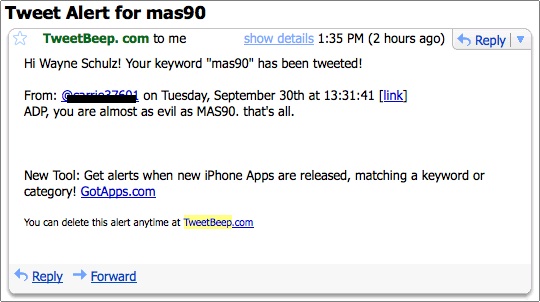
Messages within Twitter are commonlly referred to as Tweets. They can be a maximum of 140 characters long which matches the US maximum for cellular text messages (aka SMS), one of the main ways that subscribers can read tweets from those they “follow”.twitter mas90 comment

Twitter is used by people to keep up to date with what their friends are doing the day. The messages can be as innocent as indicating that someone is having a bad day at work. Often times during the day the Tweets will rant about particularly stressful events.

This is where companies have an opportunity to keep their ear to the ground and catch any type of early chit-chat on Twitter that might be unfavorable (or perhaps favorable) about their product(s).

Most companies know about Google Alerts which are saved searches that Google will use to send you messages whenever select topics appear in the news. Many companies have set up Google Alerts for themselves so that they’ll be instantly notified by Google whenever their company name appears online.Tweetbeep

TweetBeep.com is a similar service only it’s designed to scan Twitter feeds for keywords that you designate. These keywords could be your company name – or possibly the name of a competitor. When the service detects the keyword in a Twitter feed you’ll receive an email alert with the name of the person who sent the Tweet.

By monitoring the Twitter streams you can stay on top of what’s being discussed about your company and have a chance to reward or defend any unfair (or complimentary) messages.

TweetBeep is currently free and available at http://www.tweetbeep.com

Sage MAS90 and MAS200 Federal & State eFiling FAQ

1. What is Sage MAS 90 and 200 Federal and State eFiling and Reporting?
Federal and State eFiling and Reporting is a new module in Sage MAS 90 and 200 4.3, added to streamline your tax reporting processes. Over 250 federal and state forms for Unemployment, Withholding, New Hire reports, W2s, and W3s are included to assist you with filing payroll tax information. You’ll be able to automatically eFile W-2s and 1099s to the appropriate state and federal agencies, print and mail the forms to your employees, or choose to use the fee based eFiling service.

2. How does Federal and State eFiling and Reporting work?
When you use the electronic forms within Sage MAS 90 or 200 4.3, they’ll look very familiar, as they are a replica of the printed government form that get in the mail, but on your screen they won’t be blank — much of the information will already be populated in the appropriate fields for you by your system. Simply select the form from within Sage MAS 90 or 200, view and edit the information easily on your screen, and once you’ve verified it’s the way you want it, the form is ready to print or eFile.

3. How do I file my information?
If you choose to print the forms and mail them yourself, you’ll be able to utilize blank, perforated W2 & 1099 forms, available for purchase from our Forms Division, without having to align pre-printed forms. Many state forms, such as Withholding and Unemployment, allow you to print on blank paper, and don’t require the purchase of any preprinted forms. You can also go completely green by utilizing our eFiling Service, offered on a transaction fee basis, to further streamline and simplify your tax reporting process. You choose how much of the service to utilize, from efficient filing of employee New Hire or Unemployment forms to a complete filing service for W2s and 1099s, with hardcopies sent to your employees, and to you for your records. You can also provide your employees with immediate access to their copy on a secure Web site. You only incur fees for the forms you choose to eFile. You’ll always be in compliance with our automated form updates. And every report is saved in its own history file for easy retrieval to reprint, edit, or eFile.

4. What is the pricing for Federal and State eFiling and Reporting?
Federal and State eFiling and Reporting functionality is automatically included with Sage MAS 90 or 200 4.3, and works with your Payroll and Accounts Payable modules. You also have no additional cost to your maintenance or support plan. You only incur fees for the forms you choose to eFile. No sign up fees, and no subscription fees. Use Federal and State eFiling and Reporting to save significant time so you can focus on other important areas of your business.

5. How does eFiling work?
Select the W-2 or 1099 form within your Sage MAS 90 or 200 software. After confirming your W2 or 1099 information is correct, click eFile and follow the simple instructions. If filing only W2s, you do not have to complete the payment info or signature page options. This enrollment site allows you to set up your password-protected, personal, efile management account. Enter your company information, other reporting details, and POA release to be ready to efile immediately. The site maintains a complete detailed history of all filings. Personalized messaging from our eFiling administrators provide details about your filing, as well as alerts concerning critical filing information.

6. What are the eFiling fees?
Unemployment, withholding and New Hire are $7.95 per form.

The fees for the W2 and 1099 eFiling service depend on how much of the service you want to utilize and how manyforms you file.

Complete W-2 or 1099 eFile Service
W-2s are automatically eFiled to the appropriate State and Federal agencies and printed and
mailed directly to your employees as well as posted to a secure website for immediate access.
$1.49/employee

Express W-2 or 1099 eFile Service
Files Federal W-2s, State W-2s and provides Employee W-2s on-line.W-2s are automatically
eFiled to the appropriate State and Federal agencies and distributed to your employees
electronically via a secured website.
$0.99/employee

Federal & State
W-2s are eFiled to State and Federal agencies $0.99/employee
Federal or State eFile either Federal or State W-2s $0.49/employee
$19.95 minimum applies to all W-2 fillings.

7. What forms can be filed electronically?
The complete list of electronically filed forms is found here.

8. What information is saved?
For each form, it is time and date stamped, the actual filed form is saved, and the history file is encrypted.

9. How do I get updated forms to ensure I’m printing or eFiing with the most current version?
Since over 20% of forms change quarterly, we’ve built in a simple, automatic updating process for you.
Sage MAS 90 or 200 will require an Internet connection, and you’ll need to be current on your
subscription plan. The system will prompt you for your Sage Software Online login and password. You’ll
need to know

10. How do I know my eFiled W-2 was received?
You will receive an email immediately upon the receipt of the filing. Your email will contain a unique
confirmation id number, and if you choose that service, the anticipated date that your employees W2s will
be mailed.

11. How am I charged for the eFiling fees?

Payments are made via a major credit card at the time of the eFiling.

12. What if my employee looses their W2?
Never fear, your eFiling history is stored for future viewing and printing, as needed.

13. What if I need to correct a W2?
Federal or State W2s are not actually filed until their respective due dates. In most cases, if the revised
W2 is re-eFiled by March 28th, your account is simply updated to reflect the revised information.
However, if it becomes necessary, you will have the opportunity to file W2Cs if you initially used the
eFiling service.

14. Can I send printed W-2s to some employees and do online delivery for others?
Yes, with the Complete Service option, you can choose to have printed W-2s delivered to some of your
employees and others online only. You’ll be billed at the Complete Service rate for employees receiving a
printed W-2s, and Express Rate for the employees who receive their W2 online.

15. How do my employees receive logins for access to their information?

Your employees will receive this information via their email addresses. Through the history file that is
created during the eFiling process, your Payroll Administrator will have access to all their information,
including passwords.

16. If I print my own W-2s and want to only eFile my State and Federal copies, can I still provide my
employees with the convenience of the online service?

Yes, for $0.20 per employee, you can provide your employees access to their information, in cases they
need an additional copy.

17. Where do I go to learn more about this exciting new product?
You can contact your Business Partner or your Sage MAS 90 and 200 Customer Account Representative
to discuss your needs and arrange for a demo. You can also go online to read our data sheet, or attend
one of our interactive product demo webcasts. Access the eFiling site at https://sagemas.aatrix.com/.

Download copy of Sage Software 2008 eFiling FAQ for Sage MAS 90 and 200

Blackberry Storm demo model arrives in Verizon store

The Blackberry Storm seems on the fast track to your local Verizon store. An eagle eyed member of the Crackberry.com Blackberry discussion forum snapped photos of this display model at their local Verizon Wireless store.

As the first keyboardless Blackberry, the Storm has been widely anticipated by enthusiasts.

Blackberry StormThere have been far fewer leaks of this device than all previous Blackberry models. The keyboard is all touch with rumors that you can actually press on the screen and get feedback (aka – haptic). If the touch screen is widely adopted it could herald a whole generation of keyboardless berry’s.

This model Blackberry is expected to be exclusive to Verizon Wireless for an indefinite period of time. Some early rumors have the phone on an indefinite exclusivity period subject to minimum sales numbers.

The launch of both the Blackberry Bold and Blackberry Storm will also usher in the next release of the Blackberry Operating System 4.5 (or higher) whose most eagerly anticipated feature may be the inclusion of HTML email reading capabilities on all Blackberry’s. Unlike the iPhone, using HTML email on the Blackberry is dependent upon an outside service called BES (Blackberry Enterprise Server) or BIS (Blackberry Internet Service) which is a mandatory subscription that pushes email and web browsing to all Blackberry users.

via: Crackberry

Blackberry Bold on tap for November 2 release

The good folks at Research in Motion has begun distributing invitations to launch parties which will start on October 15 and culminate in New York City on October 30. These parties are in advance of the long awaited arrival of the Blackberry Bold from RIM.

Blackberry Bold Launch Party

The new Blackberry Bold will first appear on AT&T where it becomes the first 3G Blackberry to be offered on the carrier. Early reviews of this device have gushed over the much improved screen. Other than the sharper screen resolution, most of the core Blackberry Operating System seems largely unchanged.

There are a few tweaks to the operating system – such as the addition of HTML email capabilities (finally) however the jury seems to still be out on the improvements that have been made to the web browser. Since the iPhone launch the bar has been permanently raised for all smartphones.

via: Crackberry.com

MAS90′s Hidden Weapon: Extended Solutions

Many users of accounting software secretly (and often not so secretly) wish that their programs could be customized so that they more tightly fit the needs of their business. Unfortunately custom programming often proves to be both expensive and time consuming.

Not anymore.

With Sage MAS 90 and MAS 200 there is a large catalog of customizations that have already been written and can be purchased for a fixed fee.

MAS90 and MAS200 Extended SolutionsExamples of Extended Solutions include Multi-Company processing for General Ledger and Accounts Payable. With this enhancement you can have one master company processing accounts payable invoices and checks for dozens of subsidiaries. The entire due-to and due-from process is managed by the enhancement (See AP-1027 – Multiple Company Accounts Payable which provides just this functionality for only $1,795 + $265 Maintenance).

What’s so powerful about these Extended Solutions is that not only do they save you the initial development time (and money) – but as the Sage MAS 90 and MAS 200 programs are upgraded you receive the enhancements at your current level for no extra charge.

sage mas200 extended solution price list

Selecting and searching for an Extended Solution for Sage MAS90 and MAS200 is easy. Simply log into the Extended Solution Site and search for your desired functionality. Once located, you’ll see a screen with the cost, description and a link to the full product manual.

Tip: Not everyone knows this, but all of the Extended Solutions may be requested as a free trial. They will ship you the solution so that it only operates on the dummy data company code and with certain other restrictions. This gives you a chance to “try before you buy” – something not available with most other custom programming.

If you have more questions about whether an Extended Solution might be right for your business, ask yourself these questions:

  • Will I save time by having the feature (and if so how much)
  • Are there alternate procedures that I could perform that would eliminate the need for this enhancement
  • How many enhancements am I looking to purchase (Rule of thumb: Under 6 is probably ideal with most companies using only one or two).
  • Am I willing to wait an extra month or two after the main MAS 90 or MAS 200 program has been updated for my ehancements to be ready (This is the typical wait time).
  • Will I be using third party vertical solutions like Job Ops or ACS Service Managemenet which may conflict with Extended Solutions?

In general we strongly recommend the use of Extended Solutions to our clients. When a pre-written customization is required it is our favored solution based on the sheer numbers of enhancements available as well as the positive feedback we receive from our clients.

[contact-form 1 "Contact form 1"]

MAS90 accounting software pricing – everything you wanted to know but were afraid to ask

mas90 price list information.jpg

If you’ve searched enough on the Internet you likely have found lots and lots of information on MAS90 and MAS200 accounting software prices. Unfortunately not all pricing is created equal.

When you negotiate a bargain – have you really gotten a good value – or is it just the start of a long (expensive) series of challenges.

wayne upgrade mas90 4.3.jpg

I’ve been consulting on Sage MAS90 and MAS200 since 1986. I started with Cole, Frago, Cusick Chestler & Company as a CPA staff accountant. Gradually I progressed to becoming the person in charge of overseeing the computer consulting department.

After several years with Cole, Frago I moved on to Kostin, Ruffkess & Company (Connecticut’s second largest CPA firm with well over 100 professionals) and ran their technology department.

In both situations I had one guiding principle to follow when making a software recommendation to an accounting client….

Don’t recommend the wrong software so that the accounting client becomes upset and leaves for another CPA firm.

Unfortunately most of the online sources for cheap MAS90 or MAS200 don’t have that guiding principle in mind when they provide a lowball quote (and the quotes are lowball because they’ll often fail to mention labor or the pros and cons of the solution they are quoting).

I’m not going to make this into a long boring lecture – so here’s my consolidated Schulz Tips for purchasing MAS90:

#1 – The Happiest Day is When You Pay To Buy Any Accounting Software
I tell everyone that it’s often downhill after the contract is signed and the software is ordered. Here are the big “danger signals” that you may be headed for a downhill experience with your software purchase.

We’ll install that in phase # (pick a number) – aka “we’ve never done this and hopefully by the time we get to that phase we’ll figure it out”

Yes our program integrates with your accounting program – Beware of the term integration. It means different things depending upon who you are.

For someone trying to sell you a system – integration means their software will export a really ugly file that you spend hours (each month) manually fixing in order to prepare it for a (time consuming) subsequent import.

For someone BUYING a system - the words integration conjure up images of one button push and ALL the data is seamlessly transferred.

Sadly, the true integration capabilities are somewhere in the middle. Unless you know the questions to ask – you could be heading for a disaster after your software is purchased and being readied for installation.

Schulz Consulting is a Sage MAS90 and MAS200 consulting firm located in Glastonbury CT. We’ve been consulting on MAS90 and MAS200 since early 1986, Our clients are located all across the United States as well as locally.

We are happy to discuss any issues or concerns with you about your accounting software.

The fastest way to reach us is email.

wayne schulz mas90.jpg

You can also call Wayne Schulz toll-free at 888-594-4302 (Ext 701)

Setting up Sage Payment Services with MAS90 or MAS200

sage payment services mas90.jpg

Are you an existing user of Sage MAS 90 or 200 (Versions 4.2+) looking to setup Sage Payment Services on your system?

If so, here are my notes based on a recent setup for a client who was not using any credit card processing prior to adding Sage Payments.

Note: If you are a current PC Charge user – you may be eligible for a free upgrade to the Sage Payment server which is fully compatible only with Sage Payment Services ( Update: works only with the Sage Payment Services).

Condensed Installation Notes:

1. Re-enter new unlock keys to MAS 90 or MAS 200
(This has to be done so you can enable Sage Payment Service)

2. Client receives email verification of their new credit card account – this is where Merchant ID and Mkey are located – no separate paperwork is sent to the client except Visa/MC stickers

3. Turn on Sage credit card processing in MAS90 or MAS200 – Tab #3 – Server Maintenance under Company Maintenance

- Also enable credit card processing for cash receipts (if desired) in Accounts Receivable Options

4. Download the PocketSoap program and install to workstation – www.pocketsoap.com/pocketsoap/#dl

5. Setup the payment types in AR – Setup – Payment Type Maintenance

- Unlike PC Charge – the merchant # doesn’t self populate – key the Sage TERMINAL ID NUMBER in manually (from client welcome email) – IMPORTANT: To set up with Sage Payments USE THE TERMINAL ID # for all credit cards — and NOT the merchant ID as the field is labelled.


- Need the 12 digit Merchant Key (MKEY) number from the client’s welcome email
- Once you save this and then re-open payment type the “valid processor” in lower right should be checked

I did not have to re-load any software to the server (only load pocket soap [download here for free] to each workstation processing credit cards).

The above is only a summary of the instructions which is meant for those with some familiarity with MAS90 and MAS200 credit card processing. Please note that versions 4.2 and higher support the use of Sage Payment Server embedded within the software (no separate download) – so different steps may be needed for older MAS90 or MAS200 versions.

A more complete list of instructions is in the support area of Sagesoftwareonline as a pdf or download from here.

Summary

I strongly recommend this solution for ease of setup. It was a little nerve wracking – but I did it all remotely in under an hour — including testing and walking through the terminal program.

Brett Zimmerman has a great set of suggestions as well (copied below):

(Courtesy Brett Zimmerman at The Fitzgerald Group) :

* If you would like to enable auto-settling, go to the Help menu in VT (Virtual Terminal) > Tech Support, and send a message requesting that auto-settling be enabled for whatever time you’d like. Apparently this request will first go thru Underwriting for approval since auto-settling won’t be allowed for certain businesses.

* By default, for every credit card charge processed, an e-mail will be sent to the e-mail address on file. To disable this function, go to the Configuration menu in VT > E-mail Notices > General Settings.

* Although you can set VT to automatically e-mail a .csv file (raw data) for each settled batch, it’d be great if it could e-mail a nicely formatted report of the settled batches – similar to what you can view inside VT.

* Supposedly with 4.3, the PocketSOAP software won’t have to be installed on the MAS 90 workstations. (Update: You still must manually download PocketSoap)

* MyVirtualReports: It appears this is for Account Management of your SPS account.

Additional tips for Credit Card integration to MAS90 or MAS200 Bank Reconciliation:

If you apply credit cards via cash receipts you’ll notice that each individual credit card transaction goes to the bank reconciliation.

Normally the bank will clear your credit card transactions in groups.

To properly reflect this on the bank reconciliation you can setup a separate bank code (use a clearing account GL that is on the balance sheet) to hold the individual credit card charges.

When the card charges clear the bank – go into cash receipts and receive the total amount cleared into your live account and take the amounts out of the clearing account.

If you have any other questions – please call the office or use the email contact form below and we’ll be happy to explain this in more detail. We can also provide you with contact information for Sage Payment Services so you can speak with them directly.

[contact-form 1 "Contact form 1"]